This week we get hands-on (or at least code-on) with pipetting robots.
Background:
No lecture. Recitation and Tokyo Biohub node lab meetings. Submit three slides with ideas to our node by 24Feb2026.
Ideas for Tokyo Biohub Deck
GPG01: Identify transcription indicators in post reproductive goat life history indicative of alterations to NAD(H), ROS signaling, tissue specific oxidative stress and inflammation.
GPG02: Explore application of G-protein coupled receptors (GPCRs) in goats a method Chen et al. (2019) proposes more broadly to monitor bioactive microbial metabolites with associations to physiology.
GPG03: Consider systems-level synthetic biology agricultural interventions to improve yield of metabolite specific food-stuffs to support molecule mediated bidirectional interactions between goat hosts and microbiota.
Questions:
For this week, we’d like for you to do the following:
Find and describe a published paper that utilizes the Opentrons or an automation tool to achieve novel biological applications.
Write a description about what you intend to do with automation tools for your final project. You may include example pseudocode, Python scripts, 3D printed holders, a plan for how to use Ginkgo Nebula, and more. You may reference this week’s recitation slide deck for lab automation details.
While your description/project idea doesn’t need to be set in stone, we would like to see core details of what you would automate. This is due at the start of lecture and does not need to be tested on the Opentrons yet.
I propose using a cloud laboratory and automation tools to process environmental metagenomics samples with and by Oxford nanopore sequencers. Here is the problem I am attempting to address. I am only one person. My time is always constrained profoundly. This means I always am burning and undercooking items with all my pans in the fire. Still, personally and professionally I am comitted red tooth and claw to environmental protection of biodiversity and abundance of natural ecologies and agricultural middle corridors. In addition I am personally offended by inequality, especially when it comes to the allocation of scientific discovery capacity and supply lines. The most diverse places on Earth are the most imperiled and at the same time least equipped with tooling to achieve the scientific advacements they need to protect their habitats and communities. Allow me to also preface that HTGAA is a small example that the bottlenecks of which I speak are not in human capacity, it’s techology, energy, infrastructure, brick and mortar. I believe that cloud computing and automation tools are a stopgap measure urgently needed to fill the breech and provide platforms to the facilitate the synergies of natural and unnatural selection required to advance sustainability and biodiversity. However engineering these partnerships are going to be just as important as the technological capabilities. The great thing about HTGAA is that we are doing this work from the bottom-up by participating in these cohorts.
Aside from HTGAA, my work with goats actually comes from the same engineering aspiration. I never saw a goat in the U.S. until I became a community health worker and started working outside of my country. Once I left the U.S. goats were much more plentiful, especially in rural mountainous regions. I am raising goats now to learn animal husbandry of these critical animals so that I can better understand how to help raise goats anywhere, in any locale, with any resource constraint. Goats in my opinion are the first automation tool that humans partnered with to survive in extreme environments. Through this partnership goats and humans expanded their gene and environment match with the physical constraints they were encountering in their struggle to ensure their families thrived. Goats and humans share many strengths and weaknesses, mainly their dedication to their families and security of FDR’s essential freedom from uninhabitable temperature and violence, hunger, thirst.
Now to the assignment, but from this perspective, the paper I reviewed from Childs et al. (2025) compared manual and automated metagenomic workflows using Oxford nanopore sequencers and found minimal differences in outcomes assessed. The first reason I chose this paper is because it starts with a fundamental truth, long-read sequencing has transformed our understanding of the microbiome. In fact, metagenomic and microbiome catalogues were not even attempted reliably until these machines entered the OMICs revolution. Enter the pipetter. I can attest, this is monastic work. The challenge is not the tool, it’s the lab space, and the sheer magnitude of the wells that the pipetter must span. Experimental protocols require percise allocation of minute quanties of fluids over and over again. From a personal vantage I quite enjoy the process, for there are few activities more zen in my day but then I am also hyper-privleged. Again inequality rears its head into the hallways of science. Who enters the cloister of the dwindling lab spaces in the world to the shelter of the bench and how many minuites do they have to spend to achieve their objectives. Here too is another ineqality though, because let’s be honest, not their objectives but the objectives of their research supervisors–because labs are also part of the caste system.
How do we untangle all of these knots to do the do the critical work. Could it be automation is answer? This will depend on who has access to automation. Are we talking about robotic workflows that are accessible to anyone with curiosity about microbiomes and metagenomes. Likely not anytime soon. I guess it will be more about the workflows done by students with professors. This is where the revolution of OMICs and Next-Generation Sequencers must be fought. What about private start-ups, I don’t know enough to speculate here. I can ponder the task of expanding the paradigm so any student with want of bench exposure using sequencers can have it. Honestly, I think HTGAA is pursuing this admirably. The cause is certainly just. If students and professors with and without wetlab spaces can both access cloud platforms and automation labs then we can realize the type of contingent niche environment that theoretically at least could be scaled-up and that is far better than not having a foothold at all. The Childs lab (2026) certainly seems to understand this charge when they explain that automation is a game changer fit to improve throughput, reproducibility, and accuracy. What is less clear is if the solution is the automated workflow or the Oxford nanopore sequencers that true read the sample one base pair at a time very quickly and then write that information into a cloud library for template recognition against other long-read sequences with annotation.
I didn’t really leave myself enough time to do this properly, ironically because this is lambing season, but Child’s et al. (2025) do make some very interesting observations in their side-by-side comparison of manual and automated workflows. I will apply these to my project now as well.
Childs et al. (2025) explain that many of the current studies they reviewed for their article only contain high throughput amplicon from the COVID-19 Pandemic. I do not see this as a challenge at all. Instead, when I think about the COVID-19 Pandemic as front-line warrior for Metazoans I see the good we accomplished when political will was aligned with scientific aspirations, and trust that the only reason naysayers have any leeway now to gripe about the deluge of SARS-CoV-2 data and genetic contamination, is because they are alive because of mRNA vaccines and wastewater surveillance, which Oxford nanopore significantly supported.
The liquid handling robot arm of the Childs et al. (2025) study was a Bravo Automated Liquid Handing Platform. I want one. Is it worth the cost though. Apparently, the findings are not sufficient to justify a purchase, based on read length alone. In the study the manual and Bravo study arms both analyzed the same 24 samples from a range of environments across a 96-well plate. Except for read length, which was on average longer in the manual arm than the automated. We can assume, if we have ever pipetted, that the automated arm would be more consistent in the allocation of microfluidics but confounding from variation in diverse soil samples appears to have made this distinction difficult to show. Meanwhile, the manual arm included eludication of DNA samples that the automata didn’t replicate, that doesn’t seem fair to me. However, if the automated workflow literally is not able to do all of the workflow steps than that is a strong point for manual over automated arms until the landscape is level.
Here’s the big takeaway though for my project. Childs et al. (2025) did find that improved automated libraries reduced PCR artefacts and increased sensitivity provide a more accurate snapshot of the ecological taxa of the microbiota – in other words more families, species, sub-species in the samples of less abundant organisms. This is what I want to hear, because if this process was applied to five studies instead of one then we would have 5x’s the power in detection of rare organisms that contribute to the diversity of the soil ecosystems, which is what I aspire most to understand and preserve.
Final Project Ideas — DUE BY START OF FEB 24 LECTURE
Methods:
Cloud Computing
Tasks:
Assignment: Python Script for Opentrons Artwork — DUE BY YOUR LAB TIME!
Your task this week is to Create a Python file to run on an Opentrons liquid handling robot.
Review this week’s recitation and this week’s lab for details on the Opentrons and programming it.
Generate an artistic design using the GUI at opentrons-art.rcdonovan.com.
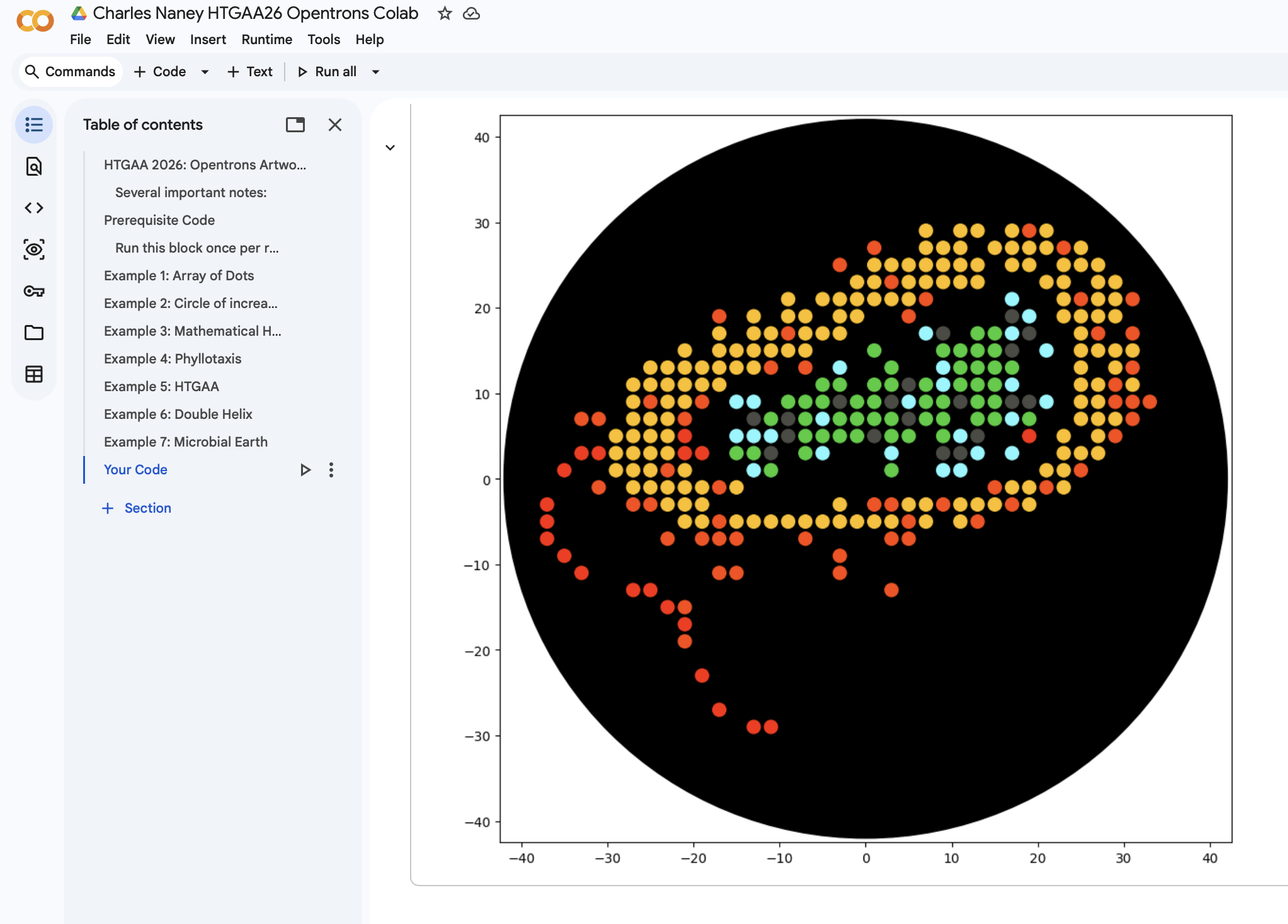
Using the coordinates from the GUI, follow the instructions in the HTGAA26 Opentrons Colab to write your own Python script which draws your design using the Opentrons.
You may use AI assistance for this coding — Google Gemini is integrated into Colab (see the stylized star bottom center); it will do a good job writing functional Python, while you probably need to take charge of the art concept.
If you’re a proficient programmer and you’d rather code something mathematical or algorithmic instead of using your GUI coordinates, you may do that instead.
[!warning] Ask for help early! If you are having any trouble with scripting, contact your TAs as soon as possible for help.
Do not wait until your scheduled robot time slot or you may not be able to complete this assignment!
If the Python component is proving too problematic even with AI and human assistance, download the full Python script from the GUI website and submit that:
Use the download icon pointed to by the red arrow in this diagram.
If you use AI to help complete this homework or lab, document how you used AI and which models made contributions.
Sign up for a robot time slot if you are at MIT/Harvard/Wellesley or at a Node offering Opentrons automation. The Python script you created will be run on the robot to produce your work of art!
At MIT/Harvard? Lab times are on Thursday Feb.19 between 10AM and 6PM.
At other Nodes? Please coordinate with your Node.
Submit your Python file via this form.
Post-Lab Questions — DUE BY START OF FEB 24 LECTURE
One of the great parts about having an automated robot is being able to precisely mix, deposit, and run reactions without much intervention, and design and deploy experiments remotely.
For this week, we’d like for you to do the following:
Find and describe a published paper that utilizes the Opentrons or an automation tool to achieve novel biological applications.
Write a description about what you intend to do with automation tools for your final project. You may include example pseudocode, Python scripts, 3D printed holders, a plan for how to use Ginkgo Nebula, and more. You may reference this week’s recitation slide deck for lab automation details.
While your description/project idea doesn’t need to be set in stone, we would like to see core details of what you would automate. This is due at the start of lecture and does not need to be tested on the Opentrons yet.
Example 1: You are creating a custom fabric, and want to deposit art onto specific parts that need to be intertwined in odd ways. You can design a 3D printed holder to attach this fabric to it, and be able to deposit bio art on top. Check out the Opentrons 3D Printing Directory.
Example 2: You are using the cloud laboratory to screen an array of biosensor constructs that you design, synthesize, and express using cell-free protein synthesis.
Echo transfer biosensor constructs and any required cofactors into specified wells.
Bravo stamp in CPFS reagent master mix into all wells of a 96-well / 384-well plate.
Multiflo dispense the CFPS lysate to all wells to start protein expression.
PlateLoc seal the plate.
Inheco incubate the plate at 37°C while the biosensor proteins are synthesized.
XPeel remove the seal.
PHERAstar measure fluorescence to compare biosensor responses.
Final Project Ideas — DUE BY START OF FEB 24 LECTURE
As explained in this week’s recitation, add a slide in your Node’s section of this slide deck with an idea you have for an Individual Final Project. Be sure to put your name on your slide!
By Eyal Perry, Laura Maria Gonzalez, Dominika Wawrzyniak, Alex Hadik, Suvin Sundararajan, Ronan Donovan
This notebook contains a few examples that demonstrates how the Opentrons OT-2 can be used to draw arbitrary patterns using the the Python Opentrons API. These examples can and should be used as your template as you try to pattern your own colorful, synthetically engineered bacteria.
To use this, make your own copy of this Colab, and in that copy you can run and edit the last section (and your work will be saved in your copy!).
Note: After learning about how to program designs using colab and python, you may choose to print more designs with automated tools like Opentrons Art Interface.
Each example consists of two blocks of code:
The first code block is where the pattern is drawn using .aspirate(), .move_to(), and dispense_and_detach() (as a wrapper around .dispense()) commands (similar to G-code). This block will typically generate no output, as it’s just loading the code (but doesn’t run it yet). This block of code can later be copied as-is and saved as a .py file to be executed on a real Opentrons machine.
The second code block runs a simple simulation that visualizes the pipetted pattern by executing your code in the simulator in this colab. This block will draw the state of the plate after running the robot code.
At the end is a section for you to code your design in, with the same two code blocks. Make your own copy of this Colab notebook and work in your copy. When ready, upload the link to your first block in this section to the linked google form a day before your lab date! Don’t edit the second block in this section, as only the first block will be run on the robot.
Several important notes:
All units are in mm
Never go beyond a radius of 40mm from (0,0). If you do, you might hit the walls of the petri dish and all hell breaks loose, or you might dispense onto the wall of or even outside the petri dish. (Some common “90mm” or “100mm” petri dishes only have an inner diameter of 84mm in the bottom plate, and the tip occupies a radius of a couple mm.)
For the Black Agar Plates, dispense 1 uL drops by default. (If you are trying for a particular effect, going slightly higher in some places may be acceptable.) While that may sound like a small quantity, the E.coli will still be visible (especially after growing) and small “pixel” sizes can produce more detailed patterns.
Be careful of dispensing samples too close to each other! They will move around slightly depending on the size of the drop. 1uL drops 2mm apart may sometimes run together or may stay mostly distinct even after incubation; 1uL drops 5mm apart will almost always stay distinct, but give you less than half the “resolution” for your art. Midway between those - 3.5mm separation - may be a happy medium. (See past year photos here and in the Lab Protocol and count dots along one axis; these of course show the ones which were lucky enough to mostly not run together…)
On the robot if you dispense and immediately move the tip 1cm to the left it will create a streak of bio-ink (shaped according to the viscosity of the liquid). The simulator accounts for this basic effect, and you will see spurious lines between your dots or to random locations in the visualization. We have provided a routine dispense_and_detach() that dispenses and moves the tip slightly up & down to fully clear the droplet; you can use this in your code both for the simulator and the robot to avoid streaking.
We have defined standard configuration for the robot deck for this lab, and our template code follows it. We plan to have Red-, Yellow-, Green-, Cyan-, and Blue-fluorescing bacteria (but no others) at all sites in the robot for your use, and have provided a routine location_of_color() you can use to retrieve our standardized configuration’s location of a named color (which you can pass to an aspirate() call).
Pay attention to any text output from the simulator (typically just above the plate image) - it can give useful diagnostics and statistics. Don’t get so focused on your beautiful drawing that you forget to check this every once and a while.
Remember not to waste any resources (here tips & reagents, as explained in the Lab Protocol – you can confirm via the “Volume Totals by Color” and “Tip Count” summaries shown after every successful run – but don’t cross-contaminate your color wells.
The visualization is not 100% accurate. We don’t model any flud dynamics, so any streaking if you don’t use dispense_and_detach(), any effects of dispensing from z>0, and even the droplet sizes in all cases are not physically realistic; and the simulator doesn’t have an awareness of the 3D positions of labware. (Feel free to contribute improvements to the simulator!)
The simulation is not even close to a 100% complete reimplementation of the Opetrons API. Some commands will work on the OT-2 but will cause errors in the simulation (Feel free to contribute!).
After your code is done, to submit it to be run on a robot:
Make sure your code is accessible to us: in your colab click the “Share” icon in the upper right, set “General access” so that “Anyone with the link” can be a “Viewer”.
Copy to the clipboard a link to your code: right-click in the first code block (which has the metadata = {...} section near the top and your code at the end) and choose “Copy link to cell”
Paste this URL into the Google form for submitting to the OT-2 and submit at least a day before your robot time slot.
The following block of code contains required installations and the simulation/visualization code. It only needs to be run once per runtime.
When run, it will output errors declaring “ERROR: pip’s dependency resolver does not currently take into account all the packages that are installed.” and list some package incompatibilities; that is expected, and is a result of the Opentrons API requiring an old version of some libraries. (No other errors are expected.)
This block can be re-run in a runtime without ill effect (but will show the same errors every time).
Run this block once per runtime to set up your environment
#@title Run this block once per runtime to set up your environment
The colab now comes with too new a version of numpy; opentrons still needs an older one.
So set up venv-like isolation of my pip installs (separated from colab packages) for all subsequent cells.
(Without doing this, colab would require restarting the runtime right after installing a different numpy version.)
import sys, os
py = f"{sys.version_info.major}.{sys.version_info.minor}"
PKG = f"/content/venv/lib/python{py}/site-packages"
os.makedirs(PKG, exist_ok=True)
if PKG not in sys.path: sys.path.insert(0, PKG)
os.environ[“PIP_TARGET”] = PKG # routes !pip / %pip installs into the venv
os.environ[“PYTHONNOUSERSITE”] = “1”
Install opentrons into the venv (and all its dependencies!) BEFORE any import numpy etc.
%pip install -q –upgrade –target “$PKG” opentrons
Now opentrons has been cleanly installed in its own venv-like environment with
versions of packages it likes; proceed to use it “normally” from here.
from opentrons import types
import matplotlib.pyplot as plt
plt.rcParams[“figure.figsize”] = (10,10)
Petri dish size constants
PETRI_INNER_DIAMETER = 84 # 84mm is hopefully a tight lower bound on inner diameter of “90mm” & “100mm” petri dishes
MAX_DRAW_RADIUS = PETRI_INNER_DIAMETER/2 - 2 # leave 2mm margin for the tip size, drop size, miscalibration, etc.
Define some classes for our custom HTGAA Opentrons simulator/visualizer
def same2DLocation(loc1, loc2): # ignores z (=> tests x, y, and labware)
return loc1.point.x == loc2.point.x and loc1.point.y == loc2.point.y and loc1.labware == loc2.labware
def mock_print(str):
#print("…\n" + str)
pass
each PipetteSim instance tracks what it’s dispensed; if you have multiple, need to call visualize() on each.
(can’t unify multiple by making the instance variables into class variables; note this colab has at least
one instance per example, and we don’t want those sharing dispense states.)
class PipetteSim: # modeled after InstrumentContext in the opentrons api
def init(self, instrument_official_name, mount_LR, tip_rack_list, well_colors):
if instrument_official_name != “p20_single_gen2”:
raise ValueError(f"Unsupported pipette {instrument_official_name} – should be p20_single_gen2")
self.max_volume = 20
self.instrument_official_name = instrument_official_name
if mount_LR != "right":
  raise ValueError(f"Unsupported pipette mount {mount_LR} -- should be right")
self.mount_LR = mount_LR

if tip_rack_list[0].labware_official_name != "opentrons_96_tiprack_20ul":
  raise ValueError(f"Unsupported tip rack {tip_rack_list[0].labware_official_name} -- should be opentrons_96_tiprack_20ul")
self.tip_rack_list = tip_rack_list

self.well_colors = well_colors
self.droplets_x = []
self.droplets_y = []
self.droplets_size = []
self.droplets_color = []
self.smears = []                # list of 3-tuples: (xlist, ylist, color)
self.location = nullLocation    # used by dispense_and_detach()
self.justDispensedAt = None
self.current_volume = 0
self.aspirated_loc = None
self.totalAspirated = {}        # 'color' : total
self.totalDispensed = {}        # 'color' : total
self.curr_color = 'orange'
self.has_tip = False            # (in the opentrons api!)
self.tip_count = 0
def del(self):
if self.has_tip:
raise Exception("### ERROR: Run completed without dropping the tip!") # python prints but ignores exceptions in destructors
used by our dispense_and_detach() routine
def _get_last_location_by_api_version(self): # (in the opentrons api!)
return self.location
use the well id to make up a location on the petri dish diagram:
D6 in the center, A1 lower left, H12 upper right (assuming 96-well, but will work for any)
def smearIfJustDispensed(self, loc): # (NOT in opentrons api)
assert(isinstance(loc, (types.Location, WellMock)))
if self.justDispensedAt is not None:
newloc = loc if isinstance(loc, types.Location) else self.petriLocOfWell(loc)
if not same2DLocation(self.justDispensedAt, newloc):
line_end = self.justDispensedAt.move(0.5 * (newloc.point - self.justDispensedAt.point))
self.smears.append(([self.justDispensedAt.point.x, line_end.point.x],
[self.justDispensedAt.point.y, line_end.point.y],
self.curr_color))
self.justDispensedAt = None
def dispense(self, volume, location): # (in opentrons api)
assert(isinstance(location, types.Location)) # not allowing dispensing into well or trashbin/wastechute for this lab – petri only!
assert(isinstance(volume, (int, float)))
if (location.point.x2 + location.point.y2 > MAX_DRAW_RADIUS**2):
raise ValueError(f’Dispensing outside “safe” area: Point ({location.point.x}, {location.point.y}) is more than’ +
f" {MAX_DRAW_RADIUS}mm away from the petri dish’s center.")
if not self.has_tip:
raise RuntimeError(“dispense() called when no tip was being held”)
if self.current_volume < volume:
raise ValueError(f"You dispensed {volume}uL, which is more than was in the pipette ({self.current_volume}uL).")
if volume <= 0:
raise ValueError(f"Dispensing {volume}uL – you should dispense a positive amount.")
if location.point.z < 0:
raise ValueError(f"dispense() passed a location with z={location.point.z} – do not go below z=0!")
if location.point.z >= 10:
print(f"Dispensing from a location with z={location.point.z} – do you really want to dispense from that high?")
self.smearIfJustDispensed(location)
self.current_volume -= volume
self.droplets_x.append(location.point.x)
self.droplets_y.append(location.point.y)
self.droplets_size.append(volume * 100) # unprincipled scale factor (1uL->100 sq.pt), but it works
self.droplets_color.append(’lime’ if self.curr_color.lower()==‘green’ else self.curr_color) # map green -> lime (looks more like GFP)
self.totalDispensed.setdefault(self.curr_color, 0)
self.totalDispensed[self.curr_color] += volume
self.location = location
self.justDispensedAt = location
def aspirate(self, volume, location): # (in opentrons api)
assert(isinstance(volume, (int, float)))
assert(isinstance(location, (types.Location, WellMock)))
if not self.has_tip:
raise RuntimeError(“aspirate() called when no tip was being held”)
if volume + self.current_volume > self.max_volume:
raise ValueError(f"Aspirating {volume}uL + {self.current_volume}uL already in pipette = {volume + self.current_volume}uL,"
f" which is more than the pipette can hold ({self.max_volume}uL).")
if volume <= 0:
raise ValueError(f"Aspirating {volume}uL – you should aspirate a positive amount.")
if self.aspirated_loc is not None and self.aspirated_loc != location:
raise RuntimeError(f"Cross-contaminating wells {self.aspirated_loc} and {location} with a single pipette")
self.aspirated_loc = location
self.smearIfJustDispensed(location)
self.current_volume += volume
if isinstance(location, WellMock):
if location.well_id.upper() not in (id.upper() for id in self.well_colors.keys()):
raise ValueError(f"aspirate() was passed well location {location} which hasn’t been configured to have a color.")
color = location.color()
newloc = location
else: # legal for aspirate() but we should probably treat this as an error for this lab? right now marking it white…
print(f"WARNING – aspirate() passed a Location rather than a well – are you sure you know what you’re doing?")
if location.point.z < 0:
raise ValueError(f"aspirate() passed a location with z={location.point.z} – do not go below z=0!")
color = ‘white’ # we don’t know where they’re asiprateing from… use an unusual color to mark it.
newloc = self.petriLocOfWell(location)
self.curr_color = color
self.totalAspirated.setdefault(color, 0)
self.totalAspirated[color] += volume
self.location = newloc
def pick_up_tip(self): # (in opentrons api)
loc = types.Location(types.Point(x=-MAX_DRAW_RADIUS, y=MAX_DRAW_RADIUS, z=0), ‘Pickup Tip’)
self.smearIfJustDispensed(loc)
if self.has_tip:
raise RuntimeError(“pick_up_tip() called when already holding a tip”)
self.has_tip = True
assert(self.aspirated_loc is None)
self.tip_count += 1
self.current_volume = 0
self.location = loc
def drop_tip(self): # (in opentrons api)
loc = types.Location(types.Point(x=MAX_DRAW_RADIUS, y=MAX_DRAW_RADIUS, z=0), ‘Drop Tip’)
self.smearIfJustDispensed(loc)
if not self.has_tip:
raise RuntimeError(“drop_tip() called when no tip was being held”)
self.has_tip = False
self.aspirated_loc = None
self.current_volume = 0
self.location = loc
def move_to(self, location): # (in opentrons api)
if location.point.z < 0:
raise ValueError(f"move_to() passed a location with z={location.point.z} – do not go below z=0!")
self.smearIfJustDispensed(location)
self.location = location
def visualize(self): # (NOT in opentrons api)
print("\n=== VOLUME TOTALS BY COLOR ===")
for color in self.totalAspirated.keys() | self.totalDispensed.keys():
comment = ’’
if self.totalAspirated.setdefault(color, 0) != self.totalDispensed.setdefault(color, 0):
comment = “\t\t##### WASTING BIO-INK : more aspirated than dispensed!”
print(f"\t{color}:\t\t aspirated {self.totalAspirated[color]}\t dispensed {self.totalDispensed[color]}{comment}")
print(f"\t[all colors]:\t[aspirated {sum(self.totalAspirated.values())}]\t[dispensed {sum(self.totalDispensed.values())}]")
print(f"\n=== TIP COUNT ===\n\t Used {self.tip_count} tip(s) (ideally exactly one per unique color)")
print("\n") # plus prints its own newline
## uncomment (only) one of these corresponding to the background medium you're printing on
plt.gca().add_patch(plt.Circle((0, 0), radius=PETRI_INNER_DIAMETER/2, color='#000000', fill=True)) # petri dish - 84mm inner diam, black agar plate
#plt.gca().add_patch(plt.Circle((0, 0), radius=PETRI_INNER_DIAMETER/2, color='#000000', fill=False)) # petri dish - 84mm inner diam, paper insert
#plt.gca().add_patch(plt.Circle((0, 0), radius=PETRI_INNER_DIAMETER/2, color='#d7ca95', fill=True)) # petri dish - 84mm inner diam, agar plate

plt.scatter(self.droplets_x, self.droplets_y, self.droplets_size, c=self.droplets_color)

for xlist,ylist,color in self.smears:
    plt.gca().plot(xlist, ylist, color=color, linewidth=4, solid_capstyle='round')

plt.xlim((-(PETRI_INNER_DIAMETER/2 + 0.5), PETRI_INNER_DIAMETER/2 + 0.5))
plt.ylim((-(PETRI_INNER_DIAMETER/2 + 0.5), PETRI_INNER_DIAMETER/2 + 0.5))
plt.show()
class WellMock:
def init(self, well_id, well_color, labware_official_name):
self.well_id = well_id
self.labware_official_name = labware_official_name
self.well_color = well_color if well_color else ‘purple’
def get_row_col(self):          # (NOT in opentrons api)
    row = ord(self.well_id[0].upper())
    col = int(self.well_id[1:])
    return (row, col)

def set_row_col(self, row, col):# (NOT in opentrons api)
    self.well_id = chr(row) + str(col)

def color(self):                # (NOT in opentrons api)
    return self.well_color

def bottom(self, z):            # (in opentrons api)
    assert z >= 0
    return self

def center(self):               # (in opentrons api)
    return self

def top(self, z=0):             # (in opentrons api)
    assert(isinstance(z, (int, float)))
    return types.Location(types.Point(x=0, y=0, z=z), 'Well')
    # return self

def move(self, location):       # (NOT in opentrons api) -- why do we have this here? what do we think it should do, move a well?
    assert(isinstance(location, types.Location))
    return self

def __eq__(self, other):
    return self.__class__ == other.__class__ and self.__dict__ == other.__dict__

def __repr__(self):
    return self.well_id
    if "p20" in instrument_official_name:
        self.display_name = "P20"
        self.vol_range = (1, 20)
    elif "p300" in instrument_official_name:
        self.display_name = "P300"
        self.vol_range = (20, 300)
    elif "p1000" in instrument_official_name:
        self.display_name = "P1000"
        self.vol_range = (100, 1000)
    else:
        mock_print("WARNING: UNSUPPORTED PIPETTE")
        assert false

def advance_tip(self):
    row, col = self.starting_tip.get_row_col()

    row += 1
    if row > ord('H'):
        row = ord('A')
        col += 1

    if col > 12:
        mock_print("WARNING: OUT OF TIPS!!!")
        assert false

    self.starting_tip.set_row_col(row, col)

def pick_up_tip(self):
    row, col = self.starting_tip.get_row_col()
    assert(row >= ord('A') and row <= ord('H'))
    assert(col >= 1 and col <= 12)
    mock_print(self.display_name + " is picking up a tip from " + str(self.starting_tip))
    self.advance_tip()

def drop_tip(self):
    mock_print(self.display_name + " is dropping a tip");

def aspirate(self, volume, well):
    assert(isinstance(volume, (int, float)))
    assert(isinstance(well, WellMock))
    assert volume >= self.vol_range[0] and volume <= self.vol_range[1]
    mock_print("##### " + str(well.labware_official_name) + " [" + str(well.well_id) + "] ---> (" + str(volume) + "uL)")

def dispense(self, volume, well):
    assert(isinstance(volume, (int, float)))
    assert(isinstance(well, WellMock))
    assert volume >= self.vol_range[0] and volume <= self.vol_range[1]
    mock_print("##### " + str(well.labware_official_name) + " [" + str(well.well_id) + "] <--- (" + str(volume) + "uL)")

def blow_out(self):
    mock_print(self.display_name + " blow out")

def mix(self, repetitions, volume, well):
    assert(isinstance(repetitions, int))
    assert(isinstance(volume, (int, float)))
    assert(isinstance(well, WellMock))
    assert volume >= self.vol_range[0] and volume <= self.vol_range[1]
    mock_print("##### " + str(well.labware_official_name) + " [" + str(well.well_id) + "] - Mixing - " + str(repetitions) + " times, volume " + str(volume) + "uL")

def move_to(self, location, force_direct=False):
    assert(isinstance(force_direct, bool))
    assert(isinstance(location, WellMock))
    mock_print(self.display_name + " is moving");
class OpentronsMock:
def init(self, well_colors):
self.well_colors = well_colors
self.pipette = None
#self.location_cache = None # unimplemented: opentrons api’s more canonical way to get last_location, but these protocols don’t need it
def home(self):
    mock_print("Going home!")

# the opentrons api names these arguments: self, load_name, location, label
def load_labware(self, labware_official_name, deck_slot, display_name):
    mock_print("Loaded " + str(labware_official_name) + " in deck slot " + str(deck_slot))
    return LabwareMock(labware_official_name, deck_slot, display_name, self.well_colors)

# the opentrons api names these arguments: self, module_name, location
def load_module(self, module_official_name, deck_slot=0):
    mock_print("Loaded module " + str(module_official_name) + " in deck slot " + str(deck_slot))
    return ModuleMock(module_official_name, deck_slot, self.well_colors)

# the opentrons api names these arguments: self, instrument_name, mount, tip_racks
def load_instrument(self, instrument_official_name, mount_LR, tip_rack_list):
    self.pipette = PipetteSim(instrument_official_name, mount_LR, tip_rack_list, self.well_colors)
    return self.pipette

def pause(self):
    mock_print("Robot pause")

def visualize(self):
    self.pipette.visualize()
Put your name in the ‘author’ field of the metadata near the top of the first block, give your protocol a ‘protocolName’ there, and fill in the ‘description’ of what the protocol will do
Write code to create your design at the very end of the first block
DEVELOPMENT TIP: Write your code in short runnable chunks, and after you’ve written each one run both of your clode blocks (running the first one loads your code, running the second one executes it on the simulator) to see that it’s doing what you expect. Simulate often!