Week 3 Lab: Opentrons Art
Week 3 Lab: Opentrons Art
Opentrons Art Lab
In this lab, we used the Opentrons OT-2 liquid handling robot to create “art” by pipetting colored liquids into a 96-well plate.
Goal
The goal of this lab was to familiarize ourselves with the Opentrons platform, Python API, and the basics of liquid handling automation.
Protocol
- Design the Art: Use the GUI at
opentrons-art.rcdonovan.comto map colors to specific wells. - Write the Python Script: Utilize the Opentrons API (v2) to define labware (96-well plate, tip racks, reservoir) and instruments (P300 pipette).
- Setup the Robot: Load the OT-2 with the required labware. In my case, I used a reservoir for the source colors and a 96-well flat-bottom plate for the canvas.
- Run the Protocol: Execute the script via the Opentrons App or Jupyter Notebook.
Python Script
The script used to generate the art can be found in my Homework Assignment page.
Results
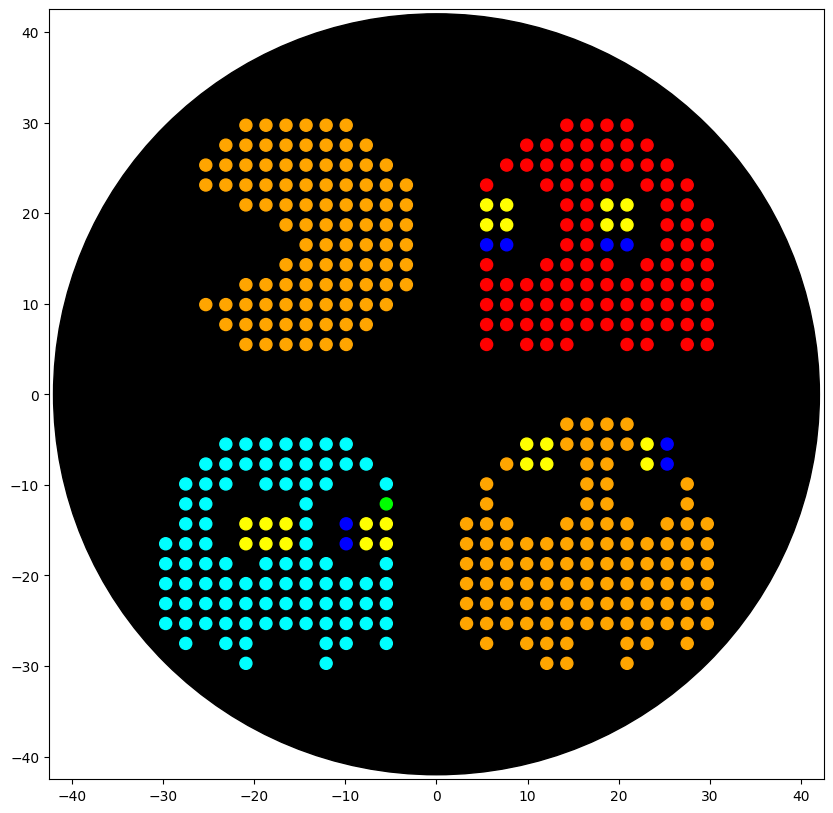
Below is the resulting “bio-art” created by the robot. Each well represents a pixel of the design, filled with precisely metered colored liquid to form Pac-Man and his ghosts.
(Resulting design generated via the Python script)
Reflection
The Opentrons OT-2 proved to be a user-friendly platform. The transition from a GUI-generated design to a functional Python script was seamless. This exercise highlighted the importance of clear labware definitions and the power of open-source automation in scaling creative biological workflows.