Week 3 HW: Lab Automation

Contents

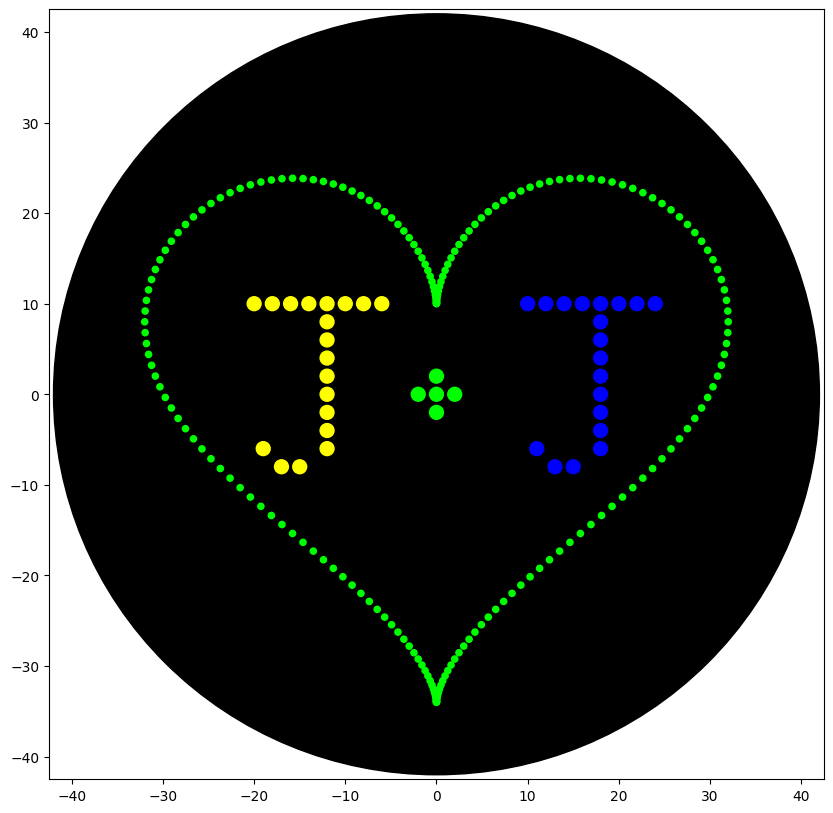
Python Script for Opentrons Artwork
from opentrons import types

metadata = {    # see https://docs.opentrons.com/v2/tutorial.html#tutorial-metadata
    'author': 'JKS',
    'protocolName': 'heartJ',
    'description': 'writes the J+J inside a heart shape',
    'source': 'HTGAA 2026 Opentrons Lab',
    'apiLevel': '2.20'
}

##############################################################################
###   Robot deck setup constants - don't change these
##############################################################################

TIP_RACK_DECK_SLOT = 9
COLORS_DECK_SLOT = 6
AGAR_DECK_SLOT = 5
PIPETTE_STARTING_TIP_WELL = 'A1'

well_colors = {
    'A1' : 'Red',
    'B1' : 'Yellow',
    'C1' : 'Green',
    'D1' : 'Cyan',
    'E1' : 'Blue'       # if in a 24-well plate, this needs to be moved to e.g. D2
}

def run(protocol):
  ##############################################################################
  ###   Load labware, modules and pipettes
  ##############################################################################

  # Tips
  tips_20ul = protocol.load_labware('opentrons_96_tiprack_20ul', TIP_RACK_DECK_SLOT, 'Opentrons 20uL Tips')

  # Pipettes
  pipette_20ul = protocol.load_instrument("p20_single_gen2", "right", [tips_20ul])

  # Modules
  temperature_module = protocol.load_module('temperature module gen2', COLORS_DECK_SLOT)

  # Temperature Module Plate
  temperature_plate = temperature_module.load_labware('opentrons_96_aluminumblock_generic_pcr_strip_200ul',
                                                      'Cold Plate')
  # Choose where to take the colors from
  color_plate = temperature_plate

  # Agar Plate
  agar_plate = protocol.load_labware('htgaa_agar_plate', AGAR_DECK_SLOT, 'Agar Plate')  ## TA MUST CALIBRATE EACH PLATE!
  # Get the top-center of the plate, make sure the plate was calibrated before running this
  center_location = agar_plate['A1'].top()

  pipette_20ul.starting_tip = tips_20ul.well(PIPETTE_STARTING_TIP_WELL)

  ##############################################################################
  ###   Patterning
  ##############################################################################

  ###
  ### Helper functions for this lab
  ###

  # pass this e.g. 'Red' and get back a Location which can be passed to aspirate()
  def location_of_color(color_string):
    for well,color in well_colors.items():
      if color.lower() == color_string.lower():
        return color_plate[well]
    raise ValueError(f"No well found with color {color_string}")

  # For this lab, instead of calling pipette.dispense(1, loc) use this: dispense_and_detach(pipette, 1, loc)
  def dispense_and_detach(pipette, volume, location):
      """
      Move laterally 5mm above the plate (to avoid smearing a drop); then drop down to the plate,
      dispense, move back up 5mm to detach drop, and stay high to be ready for next lateral move.
      5mm because a 4uL drop is 2mm diameter; and a 2deg tilt in the agar pour is >3mm difference across a plate.
      """
      assert(isinstance(volume, (int, float)))
      above_location = location.move(types.Point(z=location.point.z + 5))  # 5mm above
      pipette.move_to(above_location)       # Go to 5mm above the dispensing location
      pipette.dispense(volume, location)    # Go straight downwards and dispense
      pipette.move_to(above_location)       # Go straight up to detach drop and stay high

  ###
  ### YOUR CODE HERE to create your design
  ###

  ### heart pattern taken from Selin Sahin (2023)
  def heart_pattern(n, r, color_string, center_location):
    # generate list of points forming the heart
    scaling_factor = -2/r  # calculate scaling factor to fit pattern within 40mm radius circle
    angle_step = 2*math.pi/n
    coords = []
    for i in range(n):
        angle = i * angle_step
        x = scaling_factor*r*(16*math.sin(angle)**3)
        y = scaling_factor*(-r*(13*math.cos(angle) - 5*math.cos(2*angle) - 2*math.cos(3*angle) - math.cos(4*angle)))
        coords.append((x, y))
        

####PICK UP TIP HERE####
    pipette_20ul.pick_up_tip()

    print_every = 1     # 1=print every point; 2=print every other point; 3=print every third...

    # now plot the points
    for i, (x,y) in enumerate(coords):
        #print(i,(x,y))
        if i % (100*print_every) == 0:  # 20uL/0.2uL = 100
            # every 20th point we're printing starting with the first, aspirate 20uL total from Well 1
            pipette_20ul.aspirate(min(20, math.ceil((len(coords)-i)/print_every)), location_of_color(color_string))
        # print every other point we've calculated (was too dense otherwise)
        if i % print_every == 0:
            adjusted_location = center_location.move(types.Point(x, y))
            dispense_and_detach(pipette_20ul, 0.2, adjusted_location)

    ####DROP TIP####
    pipette_20ul.drop_tip()

  ##################################
  #### DRAW PATTERN ####
  ##################################

  heart_pattern(200, 50, 'Green', center_location)

  ###### write
  # letter J1
  pipette_20ul.pick_up_tip()

  pipette_20ul.aspirate(8, location_of_color('Yellow'))

  cursor = center_location.move(types.Point(x=-20, y = 12))

  for i in range(8):
    dispense_and_detach(pipette_20ul, 1, cursor.move(types.Point(y=-2)))
    cursor = cursor.move(types.Point(x =2))

  cursor = cursor.move(types.Point(x=-10, y=-4))

  pipette_20ul.aspirate(8, location_of_color('Yellow'))
  for i in range(8):
    dispense_and_detach(pipette_20ul, 1, cursor.move(types.Point(x=2)))
    cursor = cursor.move(types.Point(y =-2))
  
  pipette_20ul.aspirate(3, location_of_color('Yellow'))
  for i in range(2):
    dispense_and_detach(pipette_20ul, 1, cursor.move(types.Point(x=-1)))
    cursor = cursor.move(types.Point(x =-2))

  cursor = cursor.move(types.Point(x=-1, y=2))
  dispense_and_detach(pipette_20ul, 1, cursor)

  pipette_20ul.drop_tip()

### +sign
  pipette_20ul.pick_up_tip()

  cursor = center_location.move(types.Point(x=-4))

  pipette_20ul.aspirate(5, location_of_color('Green'))
  for i in range(3):
    dispense_and_detach(pipette_20ul, 1, cursor.move(types.Point(x=2)))
    cursor = cursor.move(types.Point(x=2))
  
  cursor = cursor.move(types.Point(x=-2, y=2))
  dispense_and_detach(pipette_20ul, 1, cursor)

  cursor = cursor.move(types.Point(y=-4))
  dispense_and_detach(pipette_20ul, 1, cursor)

  pipette_20ul.drop_tip()

  # letter J2
  pipette_20ul.pick_up_tip()

  pipette_20ul.aspirate(8, location_of_color('Blue'))

  cursor = center_location.move(types.Point(x=10, y = 12))

  for i in range(8):
    dispense_and_detach(pipette_20ul, 1, cursor.move(types.Point(y=-2)))
    cursor = cursor.move(types.Point(x =2))

  cursor = cursor.move(types.Point(x=-10, y=-4))

  pipette_20ul.aspirate(8, location_of_color('Blue'))
  for i in range(8):
    dispense_and_detach(pipette_20ul, 1, cursor.move(types.Point(x=2)))
    cursor = cursor.move(types.Point(y =-2))
  
  pipette_20ul.aspirate(3, location_of_color('Blue'))
  for i in range(2):
    dispense_and_detach(pipette_20ul, 1, cursor.move(types.Point(x=-1)))
    cursor = cursor.move(types.Point(x =-2))

  cursor = cursor.move(types.Point(x=-1, y=2))
  dispense_and_detach(pipette_20ul, 1, cursor)

  pipette_20ul.drop_tip()
  # Don't forget to end with a drop_tip()
opentrons artwork simulation opentrons artwork simulation

Post-lab questions

  1. Find and describe a published paper that utilizes the Opentrons or an automation tool to achieve novel biological applications.
    A paper published this month in ACS Synthetic Biology details a new workflow for automating MoClo plasmid assembly and transformation, with a semi-automated colony PCR on an Opentrons OT-2 and Opentrons Flex. These workflows are designed to be user-friendly and output the Opentrons protocol from user-supplied CSV files, which provided README files describe how to produce.

Alternatively, the authors also developed a graphical user interface which requires no coding ability. This is a novel application because it is only the second automation of MoClo/Golden Gate cloning for Opentrons system (as opposed to advanced high-throughput liquid handling systems), and this new workflow does not require Python ability as the previously published AssemblyTron workflow.

These workflows were validated by assembling plasmids with the MoClo Yeast Toolkit and MoClo SubtiToolKit, and transforming these plasmids into Saccharomyces cerevisiae and sequentially Escherichia coli and Bacillus subtilis, respectively. With both toolkits, the automated procedure achieved efficiency comparable to the manual procedures (> 90% and 60%, respectively). Figure 1: Schematic overview of the protocol design workflows developed for the Opentrons platform. Figure 1: Schematic overview of the protocol design workflows developed for the Opentrons platform.
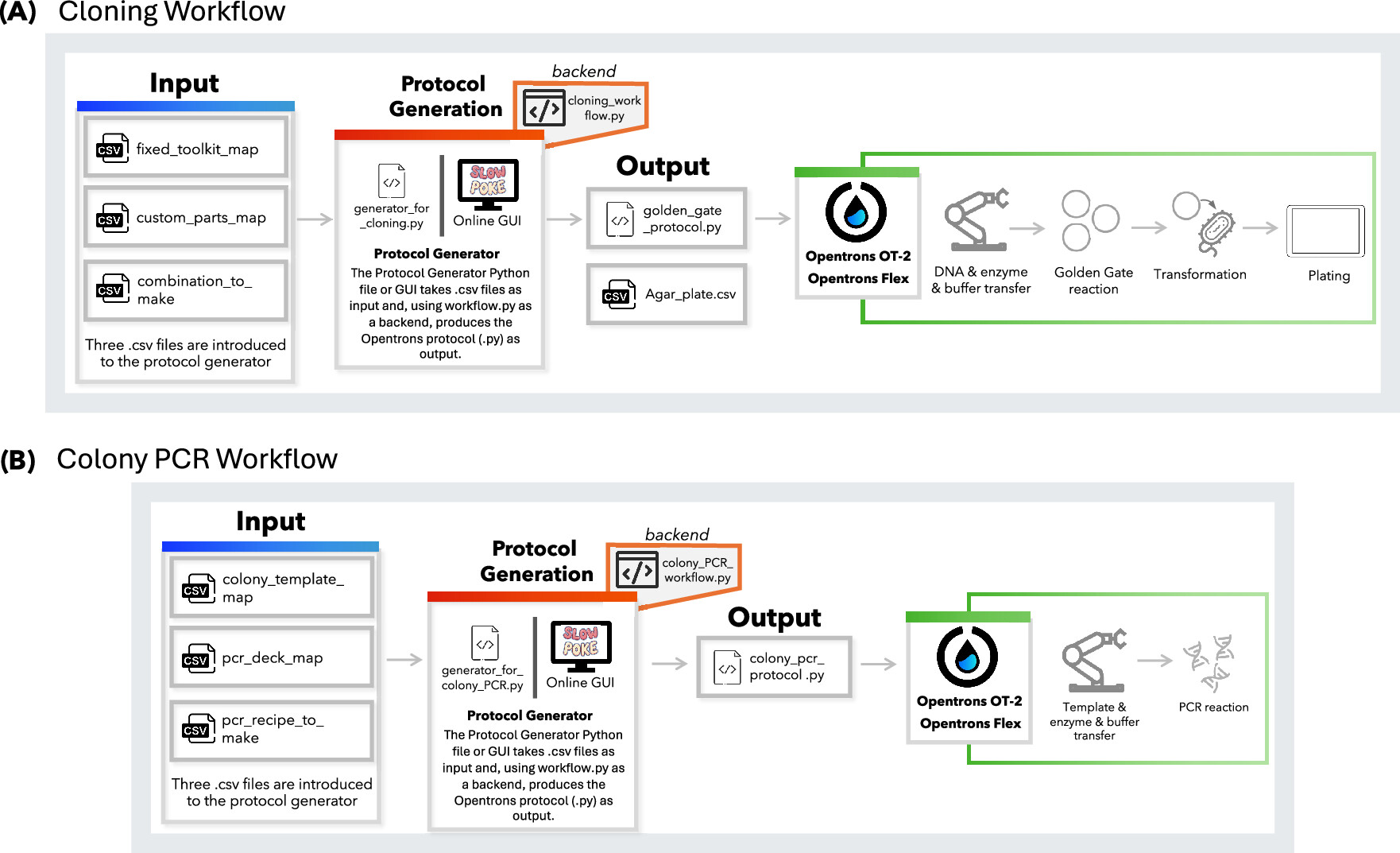
Figure 1: Schematic overview of the protocol design workflows developed for the Opentrons platform. Protocols can be generated using either the generator.py Python script via the command line or the online Slowpoke tool, which features a user-friendly GUI. Both tools run the workflow.py files in the backend. (A) Workflow for Golden Gate-based cloning, where users define genetic part layouts and assembly combinations. (B) Workflow for colony PCR, including colony selection, reagent layout, and reaction recipe input.

  • Malci, K; Meng, F; Galez, H; et al. Slowpoke: An Automated Golden Gate Cloning Workflow for Opentrons OT-2 and Flex. 2026. ACS Synthetic Biology, 15(2): 511-521. DOI: 10.1021/acssynbio.5c00629
  1. Write a description about what you intend to do with automation tools for your final project.
    I’d want to utilize the Opentrons set-up in the Victoria node to enable the possible execution of my medium-term aim with as little scientist benchtime as possible. I don’t know the exact make and model of all modules that the Victoria Opentrons has, but below is a series of possible steps that might be automatable (best use of automation would be medium or high throughput, depending on the number of designs we are able to test):
    1. Gibson Assembly or MoClo plasmid assembly
      1. Transfer reaction components into wells
      2. Heat block for digestion/ligation/PCR steps
    2. Transformation of expression plasmid
      1. Transfer plasmids and competent cells into wells
      2. Heat block for heat shock
      3. Transfer media into wells
      4. Heated shaker for recovery
      5. Incubator for overnight growth
      6. Stamp onto new plate or pick into multiple liquid cultures for culturing
      7. Incubator or heated shaker for overnight growth
    3. Readout
      1. Transfer cells (and reagents) into wells
      2. Plate reader for fluorescent or colorimetric output

Final project ideas

Brainstorming:

  • Identification of PhaC analog in Cyanobacterium aponium UTEX 3222 and overproducing or engineering for increased efficiency
    • BLAST/align with known PHA-synthases
    • Compare efficiency / mutations that improved turnover in other PhaC - test analogous mutations (aligned location, similar or different AAs). improved substrate specificity?
    • Site-specific saturation mutagenesis? Would be good use for automation
  • Quorum sensing based killswitch (i.e. cell dies if it escapes bioreactor)
    • Has to have some kind of inducible element or won’t grow after initial transformation
    • What’s good at quorum sensing already?
  • Something else??? Something in E coli that can be done on Opentron
    • Because it’s more convenient for a final project to be executed in Victoria remotely
  • Cyanobacterial expression plasmid across multiple cyano species
    • needs to include E coli machinery for manipulation and production (and conjugation, for relevant species)

Ideas:

  1. PhaC protein engineering
    1. Short term aim: Design small library of PhaC variants with expected improvement
    2. Medium term aim: Generate library and test in chassis strain
    3. Long term aim: Develop PHB bio-manufacturing cyanobacterial strain for carbon-neutral/carbon-negative plastic (depending on biodegradation).
  2. Quorum sensing based circuit for biocontainment
    1. Short term aim: Design killswitch with genetic circuit to trigger based on quorum sensing.
    2. Medium term aim: Build genetic circuit with expression based on quorum sensing with a measureable output; test circuit in E. coli.
    3. Long term aim: Optimize circuit sensitivity and test with killswitch expression; integrate into bio-manufacturing chassis strains for population-linked biocontainment.
  3. Broad cyanobacterial expression plasmid
    1. Short term aim: Design plasmid backbone based off native cyanobacterial plasmids and established E. coli machinery.
    2. Medium term aim: Test expression in multiple cyanobacterial strains (including some previously considered genetically intractable with classic broad-host-range vectors).
    3. Long term aim: Establish protocol for domestication of newly prospected, wild-type cyanobacterial strains using the cyanobacterial plasmid.
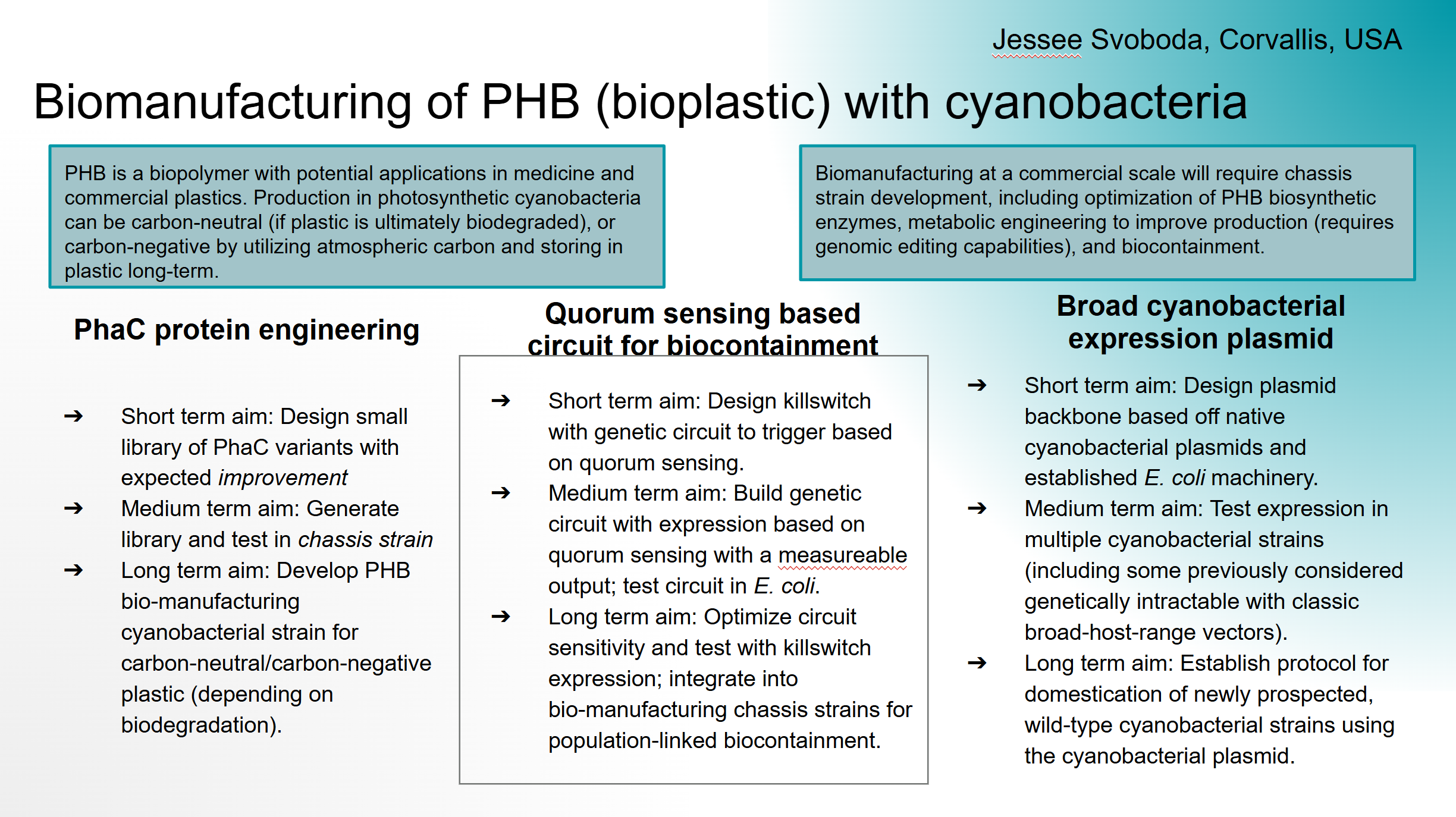
Google slide of ideas Google slide of ideas