Week 3 Lab: Opentrons Art
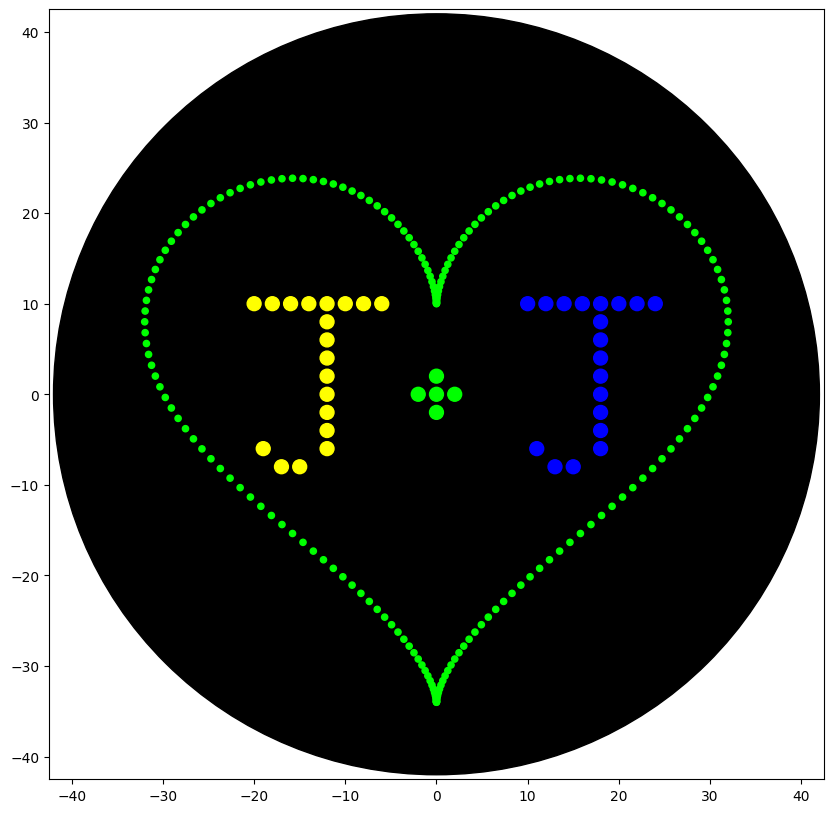
For my design, I decided to do a heart with my partner’s and my initials inside it (‘J+J’). The colors were chosen for personal significance.
I started by copying the heart-pattern from example in the Colab by Selin Sahin, only changing the color to green. Then I wrote out the letters, working off the HTGAA example by Eyal Perry. I had to do some trial and error, frequently running my simulation until it looked how I wanted.
Final code block:
from opentrons import types

metadata = {    # see https://docs.opentrons.com/v2/tutorial.html#tutorial-metadata
    'author': 'JKS',
    'protocolName': 'heartJ',
    'description': 'writes the J+J inside a heart shape',
    'source': 'HTGAA 2026 Opentrons Lab',
    'apiLevel': '2.20'
}

##############################################################################
###   Robot deck setup constants - don't change these
##############################################################################

TIP_RACK_DECK_SLOT = 9
COLORS_DECK_SLOT = 6
AGAR_DECK_SLOT = 5
PIPETTE_STARTING_TIP_WELL = 'A1'

well_colors = {
    'A1' : 'Red',
    'B1' : 'Yellow',
    'C1' : 'Green',
    'D1' : 'Cyan',
    'E1' : 'Blue'       # if in a 24-well plate, this needs to be moved to e.g. D2
}

def run(protocol):
  ##############################################################################
  ###   Load labware, modules and pipettes
  ##############################################################################

  # Tips
  tips_20ul = protocol.load_labware('opentrons_96_tiprack_20ul', TIP_RACK_DECK_SLOT, 'Opentrons 20uL Tips')

  # Pipettes
  pipette_20ul = protocol.load_instrument("p20_single_gen2", "right", [tips_20ul])

  # Modules
  temperature_module = protocol.load_module('temperature module gen2', COLORS_DECK_SLOT)

  # Temperature Module Plate
  temperature_plate = temperature_module.load_labware('opentrons_96_aluminumblock_generic_pcr_strip_200ul',
                                                      'Cold Plate')
  # Choose where to take the colors from
  color_plate = temperature_plate

  # Agar Plate
  agar_plate = protocol.load_labware('htgaa_agar_plate', AGAR_DECK_SLOT, 'Agar Plate')  ## TA MUST CALIBRATE EACH PLATE!
  # Get the top-center of the plate, make sure the plate was calibrated before running this
  center_location = agar_plate['A1'].top()

  pipette_20ul.starting_tip = tips_20ul.well(PIPETTE_STARTING_TIP_WELL)

  ##############################################################################
  ###   Patterning
  ##############################################################################

  ###
  ### Helper functions for this lab
  ###

  # pass this e.g. 'Red' and get back a Location which can be passed to aspirate()
  def location_of_color(color_string):
    for well,color in well_colors.items():
      if color.lower() == color_string.lower():
        return color_plate[well]
    raise ValueError(f"No well found with color {color_string}")

  # For this lab, instead of calling pipette.dispense(1, loc) use this: dispense_and_detach(pipette, 1, loc)
  def dispense_and_detach(pipette, volume, location):
      """
      Move laterally 5mm above the plate (to avoid smearing a drop); then drop down to the plate,
      dispense, move back up 5mm to detach drop, and stay high to be ready for next lateral move.
      5mm because a 4uL drop is 2mm diameter; and a 2deg tilt in the agar pour is >3mm difference across a plate.
      """
      assert(isinstance(volume, (int, float)))
      above_location = location.move(types.Point(z=location.point.z + 5))  # 5mm above
      pipette.move_to(above_location)       # Go to 5mm above the dispensing location
      pipette.dispense(volume, location)    # Go straight downwards and dispense
      pipette.move_to(above_location)       # Go straight up to detach drop and stay high

  ###
  ### YOUR CODE HERE to create your design
  ###

  ### heart pattern taken from Selin Sahin (2023)
  def heart_pattern(n, r, color_string, center_location):
    # generate list of points forming the heart
    scaling_factor = -2/r  # calculate scaling factor to fit pattern within 40mm radius circle
    angle_step = 2*math.pi/n
    coords = []
    for i in range(n):
        angle = i * angle_step
        x = scaling_factor*r*(16*math.sin(angle)**3)
        y = scaling_factor*(-r*(13*math.cos(angle) - 5*math.cos(2*angle) - 2*math.cos(3*angle) - math.cos(4*angle)))
        coords.append((x, y))


####PICK UP TIP HERE####
    pipette_20ul.pick_up_tip()

    print_every = 1     # 1=print every point; 2=print every other point; 3=print every third...

    # now plot the points
    for i, (x,y) in enumerate(coords):
        #print(i,(x,y))
        if i % (100*print_every) == 0:  # 20uL/0.2uL = 100
            # every 20th point we're printing starting with the first, aspirate 20uL total from Well 1
            pipette_20ul.aspirate(min(20, math.ceil((len(coords)-i)/print_every)), location_of_color(color_string))
        # print every other point we've calculated (was too dense otherwise)
        if i % print_every == 0:
            adjusted_location = center_location.move(types.Point(x, y))
            dispense_and_detach(pipette_20ul, 0.2, adjusted_location)

    ####DROP TIP####
    pipette_20ul.drop_tip()

  ##################################
  #### DRAW PATTERN ####
  ##################################

  heart_pattern(200, 50, 'Green', center_location)

  ###### write
  # letter J1
  pipette_20ul.pick_up_tip()

  pipette_20ul.aspirate(8, location_of_color('Yellow'))

  cursor = center_location.move(types.Point(x=-20, y = 12))

  for i in range(8):
    dispense_and_detach(pipette_20ul, 1, cursor.move(types.Point(y=-2)))
    cursor = cursor.move(types.Point(x =2))

  cursor = cursor.move(types.Point(x=-10, y=-4))

  pipette_20ul.aspirate(8, location_of_color('Yellow'))
  for i in range(8):
    dispense_and_detach(pipette_20ul, 1, cursor.move(types.Point(x=2)))
    cursor = cursor.move(types.Point(y =-2))

  pipette_20ul.aspirate(3, location_of_color('Yellow'))
  for i in range(2):
    dispense_and_detach(pipette_20ul, 1, cursor.move(types.Point(x=-1)))
    cursor = cursor.move(types.Point(x =-2))

  cursor = cursor.move(types.Point(x=-1, y=2))
  dispense_and_detach(pipette_20ul, 1, cursor)

  pipette_20ul.drop_tip()

### +sign
  pipette_20ul.pick_up_tip()

  cursor = center_location.move(types.Point(x=-4))

  pipette_20ul.aspirate(5, location_of_color('Green'))
  for i in range(3):
    dispense_and_detach(pipette_20ul, 1, cursor.move(types.Point(x=2)))
    cursor = cursor.move(types.Point(x=2))

  cursor = cursor.move(types.Point(x=-2, y=2))
  dispense_and_detach(pipette_20ul, 1, cursor)

  cursor = cursor.move(types.Point(y=-4))
  dispense_and_detach(pipette_20ul, 1, cursor)

  pipette_20ul.drop_tip()

  # letter J2
  pipette_20ul.pick_up_tip()

  pipette_20ul.aspirate(8, location_of_color('Blue'))

  cursor = center_location.move(types.Point(x=10, y = 12))

  for i in range(8):
    dispense_and_detach(pipette_20ul, 1, cursor.move(types.Point(y=-2)))
    cursor = cursor.move(types.Point(x =2))

  cursor = cursor.move(types.Point(x=-10, y=-4))

  pipette_20ul.aspirate(8, location_of_color('Blue'))
  for i in range(8):
    dispense_and_detach(pipette_20ul, 1, cursor.move(types.Point(x=2)))
    cursor = cursor.move(types.Point(y =-2))

  pipette_20ul.aspirate(3, location_of_color('Blue'))
  for i in range(2):
    dispense_and_detach(pipette_20ul, 1, cursor.move(types.Point(x=-1)))
    cursor = cursor.move(types.Point(x =-2))

  cursor = cursor.move(types.Point(x=-1, y=2))
  dispense_and_detach(pipette_20ul, 1, cursor)

  pipette_20ul.drop_tip()
  # Don't forget to end with a drop_tip()
Simulation image:
Unfortunately, the Victoria node was not able to run the Opentrons lab remotely as planned, as of 05/27/2026. Hopefully we can run it sometime this summer and I can upload a photo of a real plate.