Design: Snake Trimeresurus puniceus
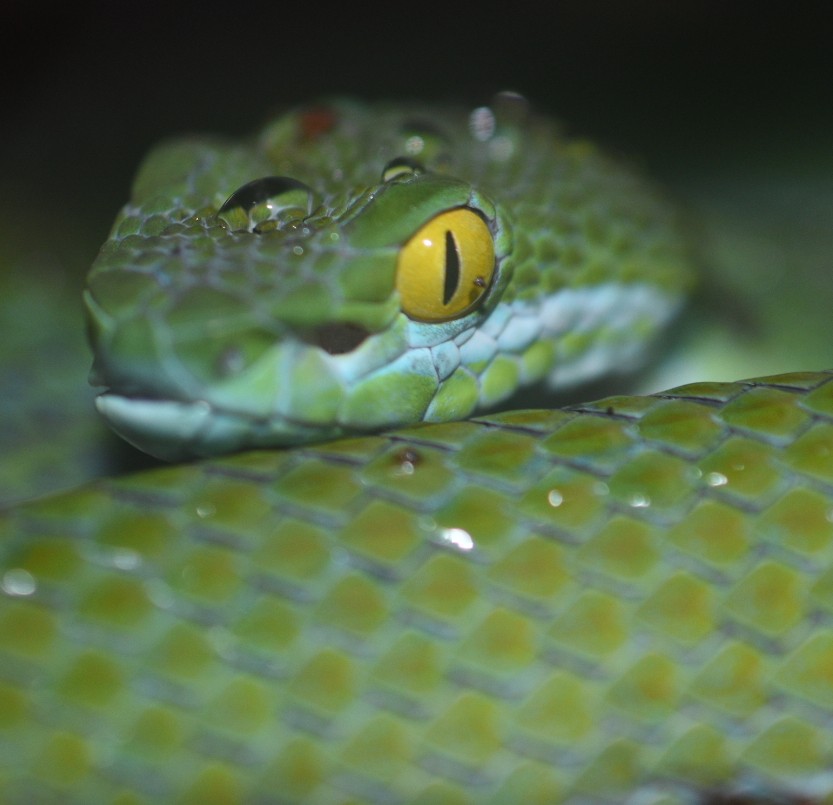
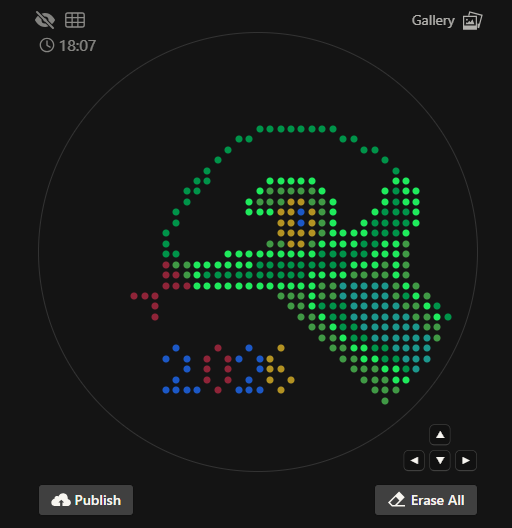
Inspired from a snake photo taken in the Oswaldo Meneses serpentarium, Lima, Peru. Art created Donovan’s Automation art interface
Python Script Design
Opentrons script was created following the instructions and ideas offered by the HTGAA Opentrons Colab. To create the script first I created a pseudocode with the idea of how the robot will work
Pseudocode
Get the coordinates of the art from donovan’s page in the form of a dictionary
Create a function Coordinate_per_color:
Pick up a 20 ul tip
For each coordinate
Check if the tip is empty (20 ul volume)
Aspirate an amount depending on the number of coordinates to fill (20 or less)
Get the x and y coordinates
Move to the x and y coordinates
Dispense 1 ul to the coordinate
Remove the tip
Call the function Coordinate_per_color for each color present in the dictionary
Following the idea of the pseudocode I followed the script design from Dominika Wawrzyniak, 2021 student and adapted to the coordinates from Donovan’s Automation page. For this first draft I decided to copy and paste the coordinates and give them a dictionary structure, then I changed the color names using the names from the robot deck setup constants. The resulting script is the following :
# Set the initial coordinates take from the donovan's page (Converted into a dictionary)Coordinates={"Green":[],"Red":[],"Blue":[],"Yellow":[],"Cyan":[]}#To avoid using many tips the objective is to create a function that takes up the points and add the volume per colordefCoordinate_per_color(color_string):# Pick up a 20 ul tippipette_20ul.pick_up_tip()# For every coordinate per colorforiinrange(len(Coordinates[color_string])):# i shows the number of positionsifi%20==0:# Aspirate a volume 20 if the total of remaining coord to paint is more than 20pipette_20ul.aspirate(min(20,len(Coordinates[color_string])-i),location_of_color(color_string))# Get the x and y coordinatesx_coordinate=Coordinates[color_string][i][0]y_coordinate=Coordinates[color_string][i][1]# Move to the x and y coordinatesadjusted_location=center_location.move(types.Point(x_coordinate,y_coordinate))# Dispense 1 ul to the positionpipette_20ul.dispense(1,adjusted_location)hover_location=adjusted_location.move(types.Point(z=2))pipette_20ul.move_to(hover_location)# Finishing drop the tippipette_20ul.drop_tip()#Call the function Coordinate_per_color for every color in the dictionaryfornameinCoordinates.keys():print(name)Coordinate_per_color(name)
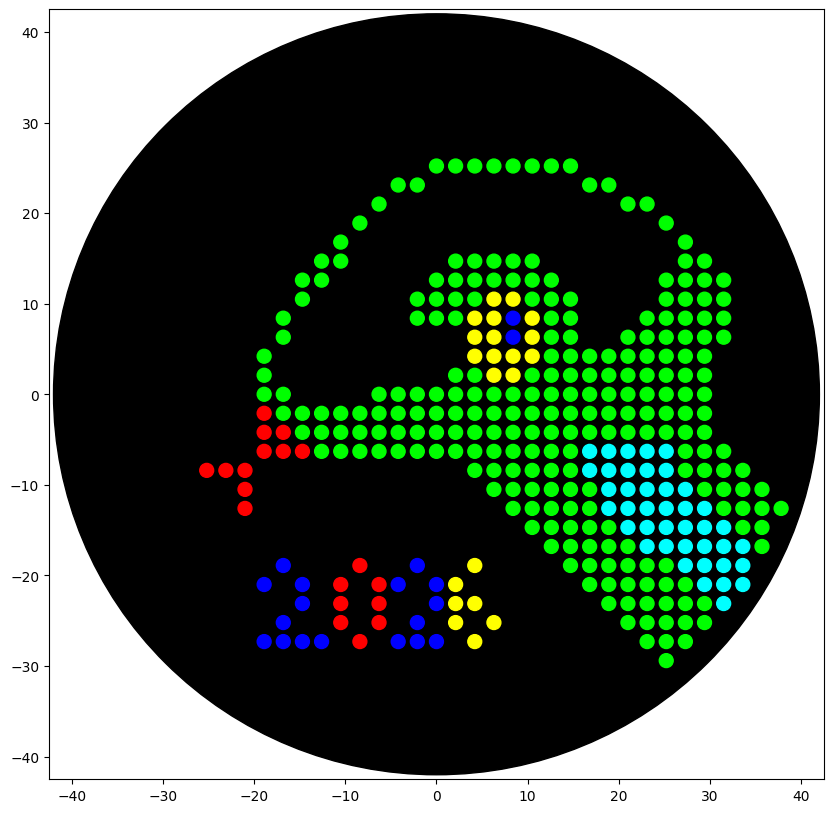
After executing the script, I simulated the visualization and got the Image I wanted to create
Second Design: Geometrical Green/Red Yin and Yang
After recieving the instructions from my node y change the design for a Yin-Yang inspired design. To create the design I comtemplated the idea of using mathematical formulas to desing the pattern.
AI assistance
ChatGPT was used to support conceptual understanding of the geometric contruction of the Yin-Yang symbol using circles and semicircles. All code implementation was independently developed by me, only using the artificial inteligence to offer some feedback.
First I created a code testing the mathematical approach which consisted in creating the design using circles and semicircles, first I integrated the mathematical code with the robot operation code resulting in a messy code
//FirstYin-YangCode# Start at the centercursor=center_location.move(types.Point(x=0,y=0))# Define de radius as 20 (To reduce the times to aspirate a volume)radius=20# Define the number of point (Default 40)points=40# Function to create semicirclesdefthetha(i):theta=np.pi*i/(points-1)returntheta# Fucntion aspiratedefaspirate(color):ifi%20==0:pipette_20ul.aspirate(min(20,points-i),location_of_color(color))# Function hoverdefhover():hover_location=adjusted_location.move(types.Point(x=0,y=0,z=2))pipette_20ul.move_to(hover_location)# Create a green semicirclepipette_20ul.pick_up_tip()foriinrange(points):aspirate("Green")theta=thetha(i)x=radius*np.sin(theta)y=(radius*np.cos(theta))adjusted_location=cursor.move(types.Point(x=x,y=y))pipette_20ul.dispense(1,adjusted_location)hover()# Create and S-divider in the circle (UpperSide)inner_radius=10foriinrange(points):aspirate("Green")theta=thetha(i)x=inner_radius*np.sin(theta)y=(inner_radius*np.cos(theta))+radius/2adjusted_location=cursor.move(types.Point(x=x,y=y))pipette_20ul.dispense(1,adjusted_location)hover()pipette_20ul.drop_tip()# Create a Red semicirclepipette_20ul.pick_up_tip()foriinrange(points):aspirate("Red")theta=thetha(i)x=radius*np.sin(theta)y=(radius*np.cos(theta))adjusted_location=cursor.move(types.Point(x=-x,y=y))pipette_20ul.dispense(1,adjusted_location)hover()# Create and S-divider in the circle (LowerSide)inner_radius=10foriinrange(points):aspirate("Red")theta=thetha(i)x=inner_radius*np.sin(theta)*-1y=(inner_radius*np.cos(theta))-radius/2adjusted_location=cursor.move(types.Point(x=x,y=y))pipette_20ul.dispense(1,adjusted_location)hover()
Second Attemp: To make the code more readable I created two custom functions called create_circle and create_semicircle. Also adapted the logic to get a list of coordinates so it can be used by the code example shared by the Node.
## Ying-Yang Code ## Create two functions that will give the coordinate for circles## Circle functiondefcreate_circle(x_center,y_center,radius,points):coordinates=[]foriinrange(points):angle=2*math.pi*i/pointsx=x_center+radius*math.cos(angle)y=y_center+radius*math.sin(angle)coordinates.append((x,y))returncoordinates## Semicircle functiondefcreate_semicircle(x_center,y_center,radius,points,direction="left"):"""
Four semicircle orientations:
- right
- left
- up
- down
"""coordinates=[]foriinrange(points):angle=math.pi*i/(points)# Change directionifdirection=="right":# Base x and y coordinates (Default = right)x=x_center+radius*math.sin(angle)y=y_center+radius*math.cos(angle)coordinates.append((x,y))elifdirection=="left":x=x_center+radius*math.sin(angle)y=y_center+radius*math.cos(angle)coordinates.append((-x,-y))elifdirection=="up":x=x_center+radius*math.cos(angle)y=y_center+radius*math.sin(angle)coordinates.append((x,y))elifdirection=="down":x=x_center+radius*math.cos(angle)y=y_center+radius*math.sin(angle)coordinates.append((-x,-y))else:raiseValueError("direction must be: right, left, top or bottom")returncoordinates# Ying-Yang Design: Using the robot script offered by the node# Green parts# Green middle circle boundary pipette_20ul.pick_up_tip()green_big_circle=create_semicircle(0,0,20,40,"right")forx,yingreen_big_circle:adjusted_location=center_location.move(types.Point(x=x,y=y))ifpipette_20ul.current_volume==0:pipette_20ul.aspirate(1,location_of_color("Green"))dispense_and_detach(pipette_20ul,1,adjusted_location)# Semicircle which center is the middle inferior part of the circlegreen_S_semicircle=create_semicircle(0,10,10,40,"left")forx,yingreen_S_semicircle:adjusted_location=center_location.move(types.Point(x=x,y=y))ifpipette_20ul.current_volume==0:pipette_20ul.aspirate(1,location_of_color("Green"))dispense_and_detach(pipette_20ul,1,adjusted_location)# Small circle whose center is at the center of the s_semicirclegreen_small_circle=create_circle(0,10,5,20)forx,yingreen_small_circle:adjusted_location=center_location.move(types.Point(x=x,y=y))ifpipette_20ul.current_volume==0:pipette_20ul.aspirate(1,location_of_color("Green"))dispense_and_detach(pipette_20ul,1,adjusted_location)pipette_20ul.drop_tip()# Red parts# Red middle circle boundary pipette_20ul.pick_up_tip()red_big_circle=create_semicircle(0,0,20,40,"left")forx,yinred_big_circle:adjusted_location=center_location.move(types.Point(x=x,y=y))ifpipette_20ul.current_volume==0:pipette_20ul.aspirate(1,location_of_color("Red"))dispense_and_detach(pipette_20ul,1,adjusted_location)# Semicircle which center is the middle inferior part of the circlered_S_semicircle=create_semicircle(0,10,10,40,"right")forx,yinred_S_semicircle:adjusted_location=center_location.move(types.Point(x=x,y=y))ifpipette_20ul.current_volume==0:pipette_20ul.aspirate(1,location_of_color("Red"))dispense_and_detach(pipette_20ul,1,adjusted_location)# Small circle whose center is at the center of the s_semicirclered_small_circle=create_circle(0,-10,5,20)forx,yinred_small_circle:adjusted_location=center_location.move(types.Point(x=x,y=y))ifpipette_20ul.current_volume==0:pipette_20ul.aspirate(1,location_of_color("Red"))dispense_and_detach(pipette_20ul,1,adjusted_location)pipette_20ul.drop_tip()
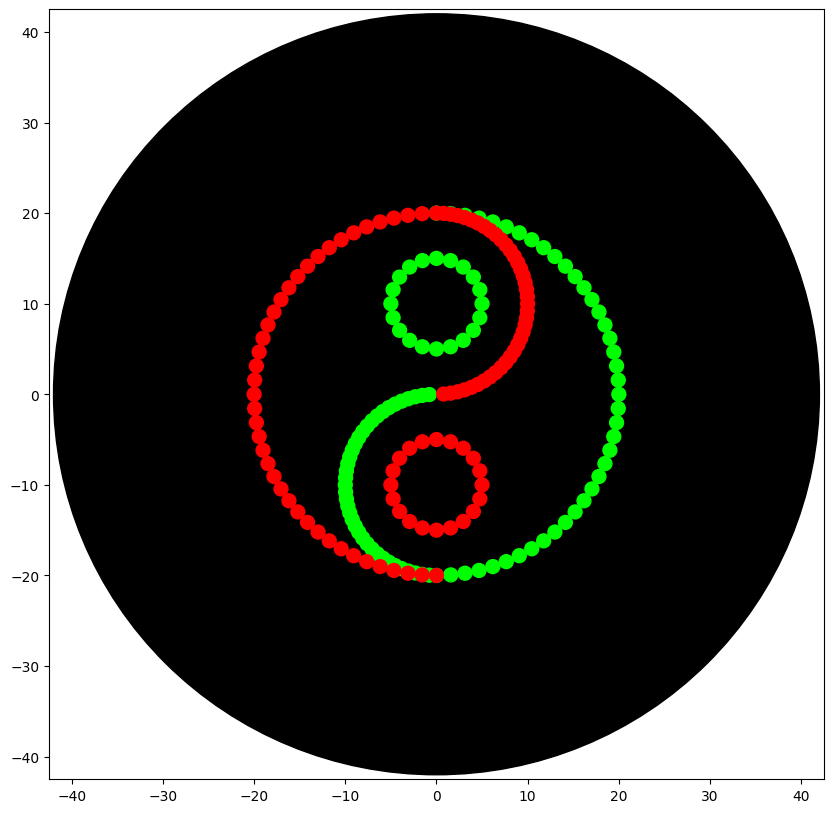
The final code allowed me to obtain the desired Yin-Yang Design
Post-Lab Questions
Find and describe a published paper that utilizes the Opentrons or an automation tool to achieve novel biological applications
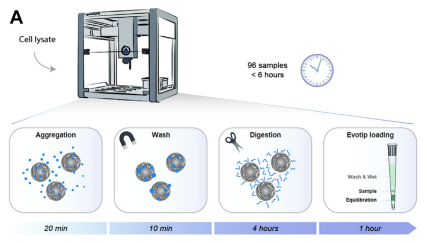
The article I found interesting is developed by Kverneland et al (2024). In this article an automated workflow is designed with the objective of preparing protein samples for LC-MS/MS Analysis. Using Opentons OT-2 robot Hela cells samples and plasma serum from patients were prepared with a shotgun approach to prepare the sample for the proteomic analysis. From this approach they analyzed 192 HeLa samples and consistently identified approximately 8000 protein groups and 130,000 peptide precursors.
The importance of this study relies on the necessity of identifying and analyzing protein profiles of many samples. Proteomics approaches offer valuable information that can be used to discover novel biomarkers and contribute to the development of personalized treatments. Also, this article provides a potential approach to creating databases containing proteomic information that could be used for novel synthetic technologies like, for example, de novo design of proteins.
Write a description about what you intend to do with outomation tools
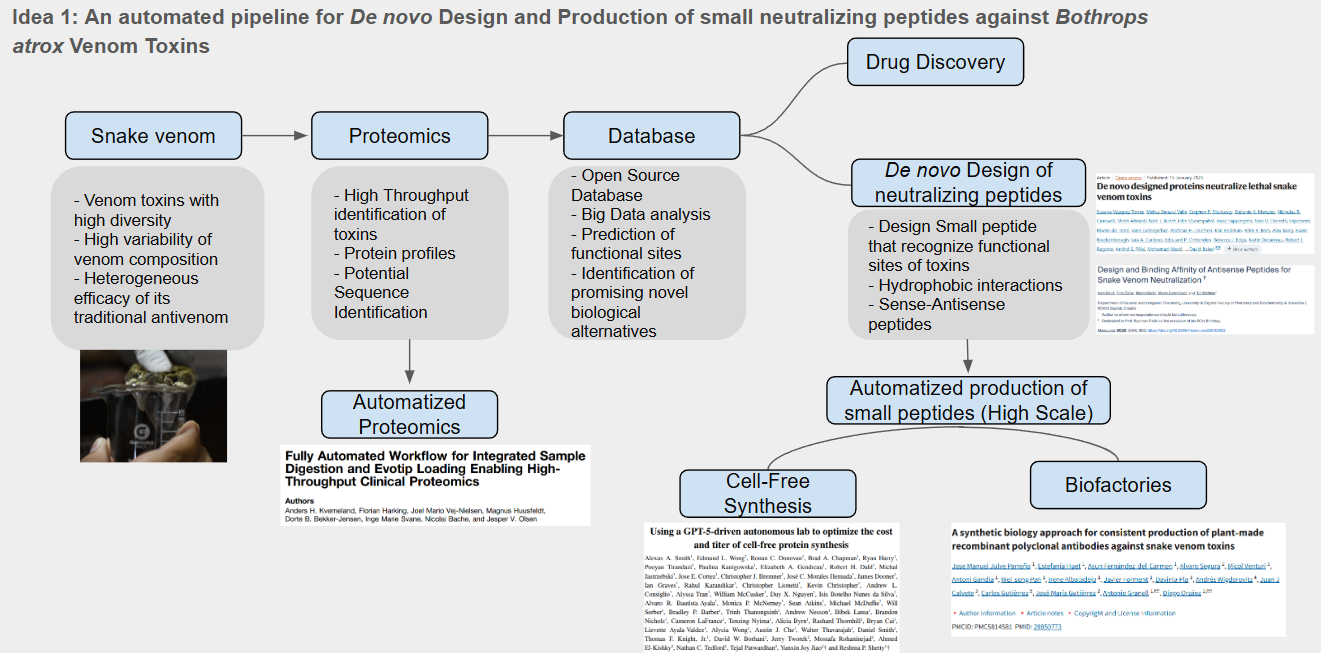
Idea 1: An automated pipeline for De novo Design and Production of small neutralizing peptides against Bothrops atrox Venom Toxins
For this idea I designed a pipeline and identified the use of automation approaches in two key activities as shown below
The use of automated proteomic can help us to identify novel proteins with potential therapeutical applications and also identify protein families and relevant sequences, this sequences can be used for the desing of small neutralizing peptides that may be used against snake venoms. Since the design would produce a high amount of potential candidates it is necessary an automated process of protein synthesis. For this I identify the use of AI driven cell-free protein synthesis as promising aproach to produce and test possible candidates to neutralize snake venom toxins.
Final Project Ideas
I created three slides containing my three final project ideas using the lessons learned until now: