Week 3 HW: Lab Automation
## What I built
I created a two-color agar-art pattern (hummingbird) using the Automation Art Interface to generate coordinate lists for red and green dots. I then implemented an Opentrons OT-2 protocol (Python API) that dispenses 1 µL droplets at each (x, y) coordinate on a black agar plate.
Key constraints and design choices
- Units: all coordinates are in mm.
- Safety boundary: all points are constrained within a 40 mm radius from (0,0).
- Droplet volume: 1 µL per dot (default for black agar plates).
- Anti-streaking: used
dispense_and_detach()motions to reduce streaking artifacts. - Contamination control: used one tip per color (red tip, green tip).
- Efficiency: aspirated in chunks (up to 20 µL for P20) to reduce overhead while avoiding waste.
How I validated
- I ran the provided Colab simulation and confirmed the visualized plate matches the intended design.
- I confirmed the protocol does not raise any “outside radius” errors.
- Simulator screenshot is saved in
assets/simulation.png.
Files
protocol.py— OT-2 run code (robot-run block)post_lab.md— mandatory post-lab questions (automation plan + paper summary)weekly_questions.md— questions + short answers for node presentationai_disclosure.md— brief disclosure of AI assistance (if applicable)assets/simulation.png— simulator visualization screenshotassets/design_screenshot.png— optional design/interface screenshot
from opentrons import types
metadata = { # see https://docs.opentrons.com/v2/tutorial.html#tutorial-metadata ‘author’: ‘Otero Maffoni Lautaro, Buenos Aires, Argentina’, ‘protocolName’: ‘Opentrons Art - Hummingbird (mRFP1 + sfGFP)’, ‘description’: ‘Two-color hummingbird. 1uL drops. Red=mRFP1, Green=sfGFP. Designed with ~2.5mm spacing.’, ‘source’: ‘HTGAA 2026 Opentrons Lab’, ‘apiLevel’: ‘2.20’ }
##############################################################################
Robot deck setup constants - don’t change these
##############################################################################
TIP_RACK_DECK_SLOT = 9 COLORS_DECK_SLOT = 6 AGAR_DECK_SLOT = 5 PIPETTE_STARTING_TIP_WELL = ‘A1’
IMPORTANT: use the STANDARD mapping (matches the real robot setup)
well_colors = { ‘A1’ : ‘Red’, ‘B1’ : ‘Yellow’, ‘C1’ : ‘Green’, ‘D1’ : ‘Cyan’, ‘E1’ : ‘Blue’ }
def run(protocol): ##############################################################################
Load labware, modules and pipettes
##############################################################################
Tips
tips_20ul = protocol.load_labware(‘opentrons_96_tiprack_20ul’, TIP_RACK_DECK_SLOT, ‘Opentrons 20uL Tips’)
Pipettes
pipette_20ul = protocol.load_instrument(“p20_single_gen2”, “right”, [tips_20ul])
Modules
temperature_module = protocol.load_module(’temperature module gen2’, COLORS_DECK_SLOT)
Temperature Module Plate
temperature_plate = temperature_module.load_labware(‘opentrons_96_aluminumblock_generic_pcr_strip_200ul’, ‘Cold Plate’)
Choose where to take the colors from
color_plate = temperature_plate
Agar Plate
agar_plate = protocol.load_labware(‘htgaa_agar_plate’, AGAR_DECK_SLOT, ‘Agar Plate’) ## TA MUST CALIBRATE EACH PLATE!
Get the top-center of the plate, make sure the plate was calibrated before running this
center_location = agar_plate[‘A1’].top()
pipette_20ul.starting_tip = tips_20ul.well(PIPETTE_STARTING_TIP_WELL)
##############################################################################
Patterning
##############################################################################
Helper functions for this lab
pass this e.g. ‘Red’ and get back a Location which can be passed to aspirate()
def location_of_color(color_string): for well,color in well_colors.items(): if color.lower() == color_string.lower(): return color_plate[well] raise ValueError(f"No well found with color {color_string}")
For this lab, instead of calling pipette.dispense(1, loc) use this: dispense_and_detach(pipette, 1, loc)
def dispense_and_detach(pipette, volume, location): """ Move laterally 5mm above the plate (to avoid smearing a drop); then drop down to the plate, dispense, move back up 5mm to detach drop, and stay high to be ready for next lateral move. """ assert(isinstance(volume, (int, float))) above_location = location.move(types.Point(z=location.point.z + 5)) # 5mm above pipette.move_to(above_location) # Go to 5mm above the dispensing location pipette.dispense(volume, location) # Go straight downwards and dispense pipette.move_to(above_location) # Go straight up to detach drop and stay high
YOUR CODE HERE to create your design
— Coordinates copied from the Automation Art Interface (units: mm) —
Use ONLY these two lists to comply with “red + green only”
mrfp1_points = [(8.75, 33.75),(11.25, 33.75),(13.75, 33.75),(6.25, 31.25),(16.25, 31.25),(18.75, 31.25),(-23.75, 28.75),(-21.25, 28.75),(3.75, 28.75),(8.75, 28.75),(18.75, 28.75),(21.25, 28.75),(-26.25, 26.25),(-18.75, 26.25),(-16.25, 26.25),(3.75, 26.25),(11.25, 26.25),(13.75, 26.25),(16.25, 26.25),(18.75, 26.25),(-26.25, 23.75),(-13.75, 23.75),(11.25, 23.75),(13.75, 23.75),(16.25, 23.75),(-33.75, 21.25),(-11.25, 21.25),(3.75, 21.25),(11.25, 21.25),(13.75, 21.25),(16.25, 21.25),(-33.75, 18.75),(-31.25, 18.75),(-18.75, 18.75),(-8.75, 18.75),(8.75, 18.75),(11.25, 18.75),(13.75, 18.75),(16.25, 18.75),(-31.25, 16.25),(-18.75, 16.25),(-6.25, 16.25),(8.75, 16.25),(11.25, 16.25),(13.75, 16.25),(-28.75, 13.75),(-13.75, 13.75),(-3.75, 13.75),(6.25, 13.75),(8.75, 13.75),(11.25, 13.75),(13.75, 13.75),(-23.75, 11.25),(-13.75, 11.25),(6.25, 11.25),(13.75, 11.25),(-18.75, 8.75),(13.75, 8.75),(-16.25, 6.25),(-13.75, 6.25),(13.75, 6.25),(-13.75, 3.75),(13.75, 3.75),(-13.75, 1.25),(11.25, 1.25),(13.75, 1.25),(8.75, -1.25),(11.25, -1.25),(13.75, -1.25),(-16.25, -3.75),(6.25, -3.75),(8.75, -3.75),(11.25, -3.75),(3.75, -6.25),(6.25, -6.25),(8.75, -6.25),(-18.75, -8.75),(1.25, -8.75),(3.75, -8.75),(6.25, -8.75),(-8.75, -11.25),(-6.25, -11.25),(-3.75, -11.25),(-1.25, -11.25),(1.25, -11.25),(3.75, -11.25),(-21.25, -13.75),(-8.75, -13.75),(-6.25, -13.75),(-3.75, -13.75),(-1.25, -13.75),(1.25, -13.75),(-23.75, -16.25),(-21.25, -16.25),(-11.25, -16.25),(-8.75, -16.25),(-6.25, -16.25),(-23.75, -18.75),(-21.25, -18.75),(-18.75, -18.75),(-16.25, -18.75),(-13.75, -18.75),(-11.25, -18.75),(-6.25, -18.75),(-23.75, -21.25),(-21.25, -21.25),(-18.75, -21.25),(-16.25, -21.25),(-13.75, -21.25),(-11.25, -21.25),(-23.75, -23.75),(-21.25, -23.75),(-18.75, -23.75),(-16.25, -23.75),(-13.75, -23.75),(-11.25, -23.75),(-26.25, -26.25),(-23.75, -26.25),(-21.25, -26.25),(-18.75, -26.25),(-16.25, -26.25),(-13.75, -26.25),(-3.75, -26.25),(-26.25, -28.75),(-23.75, -28.75),(-21.25, -28.75),(-18.75, -28.75),(-16.25, -28.75),(-13.75, -28.75),(-3.75, -28.75),(-23.75, -31.25),(-21.25, -31.25),(-18.75, -31.25),(-3.75, -31.25),(-21.25, -33.75),(-11.25, -33.75),(-8.75, -36.25),(-6.25, -36.25)] sfgfp_points = [(8.75, 31.25),(11.25, 31.25),(13.75, 31.25),(21.25, 31.25),(23.75, 31.25),(-26.25, 28.75),(6.25, 28.75),(11.25, 28.75),(13.75, 28.75),(16.25, 28.75),(-28.75, 26.25),(-23.75, 26.25),(-21.25, 26.25),(6.25, 26.25),(8.75, 26.25),(-31.25, 23.75),(-28.75, 23.75),(-23.75, 23.75),(-21.25, 23.75),(-18.75, 23.75),(-16.25, 23.75),(3.75, 23.75),(6.25, 23.75),(8.75, 23.75),(-31.25, 21.25),(-28.75, 21.25),(-26.25, 21.25),(-23.75, 21.25),(-21.25, 21.25),(-18.75, 21.25),(-16.25, 21.25),(-13.75, 21.25),(6.25, 21.25),(8.75, 21.25),(-28.75, 18.75),(-26.25, 18.75),(-23.75, 18.75),(-21.25, 18.75),(-16.25, 18.75),(-13.75, 18.75),(-11.25, 18.75),(3.75, 18.75),(6.25, 18.75),(-28.75, 16.25),(-26.25, 16.25),(-23.75, 16.25),(-21.25, 16.25),(-16.25, 16.25),(-13.75, 16.25),(-11.25, 16.25),(-8.75, 16.25),(-1.25, 16.25),(1.25, 16.25),(3.75, 16.25),(6.25, 16.25),(-26.25, 13.75),(-23.75, 13.75),(-21.25, 13.75),(-18.75, 13.75),(-16.25, 13.75),(-11.25, 13.75),(-8.75, 13.75),(-6.25, 13.75),(-1.25, 13.75),(1.25, 13.75),(3.75, 13.75),(-21.25, 11.25),(-18.75, 11.25),(-16.25, 11.25),(-11.25, 11.25),(-8.75, 11.25),(-6.25, 11.25),(-3.75, 11.25),(-1.25, 11.25),(1.25, 11.25),(3.75, 11.25),(-21.25, 8.75),(-16.25, 8.75),(-13.75, 8.75),(-11.25, 8.75),(-8.75, 8.75),(-6.25, 8.75),(-3.75, 8.75),(-1.25, 8.75),(1.25, 8.75),(3.75, 8.75),(-11.25, 6.25),(-8.75, 6.25),(-6.25, 6.25),(-3.75, 6.25),(-1.25, 6.25),(1.25, 6.25),(-11.25, 3.75),(-8.75, 3.75),(-6.25, 3.75),(-3.75, 3.75),(-1.25, 3.75),(-11.25, 1.25),(-8.75, 1.25),(-6.25, 1.25),(-3.75, 1.25),(-1.25, 1.25),(-13.75, -1.25),(-11.25, -1.25),(-8.75, -1.25),(-6.25, -1.25),(-3.75, -1.25),(-13.75, -3.75),(-11.25, -3.75),(-8.75, -3.75),(-16.25, -6.25),(-13.75, -6.25),(-11.25, -6.25),(-16.25, -8.75),(-13.75, -8.75),(-11.25, -8.75),(-18.75, -11.25),(-16.25, -11.25),(-13.75, -11.25),(-11.25, -11.25),(-18.75, -13.75),(-16.25, -13.75),(-13.75, -13.75),(-11.25, -13.75),(-18.75, -16.25),(-16.25, -16.25),(-13.75, -16.25),(-8.75, -18.75),(-8.75, -21.25),(-6.25, -21.25),(-26.25, -23.75),(-8.75, -23.75),(-6.25, -23.75),(-3.75, -23.75),(-11.25, -26.25),(-8.75, -26.25),(-6.25, -26.25),(-8.75, -28.75),(-6.25, -28.75),(-8.75, -31.25),(-6.25, -31.25),(-8.75, -33.75),(-6.25, -33.75),(-3.75, -33.75),(-3.75, -36.25)]
— Hard safety check (never exceed radius 40 mm) —
def assert_within_radius(points, max_r=40.0): for (x, y) in points: r = (x2 + y2) ** 0.5 if r > max_r: raise ValueError(f"Point outside allowed radius: (x={x}, y={y}) has r={r:.2f} mm > {max_r} mm")
assert_within_radius(mrfp1_points, 40.0) assert_within_radius(sfgfp_points, 40.0)
— Dispense dots: 1 tip per color, aspirate in chunks (P20 max 20 uL), dispense 1 uL each —
def dispense_points(color_string, points): pipette_20ul.pick_up_tip() for i, (x, y) in enumerate(points): if i % 20 == 0: pipette_20ul.aspirate(min(20, len(points) - i), location_of_color(color_string)) adjusted_location = center_location.move(types.Point(x=x, y=y)) dispense_and_detach(pipette_20ul, 1, adjusted_location) pipette_20ul.drop_tip()
Draw RED then GREEN (matches node request: red + green)
dispense_points(‘Red’, mrfp1_points) dispense_points(‘Green’, sfgfp_points)
Don’t forget to end with a drop_tip() (handled inside dispense_points)
Design and Simulation Evidence
The artistic design was generated using the Automation Art Interface and validated using the Opentrons Colab simulator. The simulation confirmed that the two-color hummingbird pattern fits inside the agar plate boundary and that the coordinates produce the intended visual output.
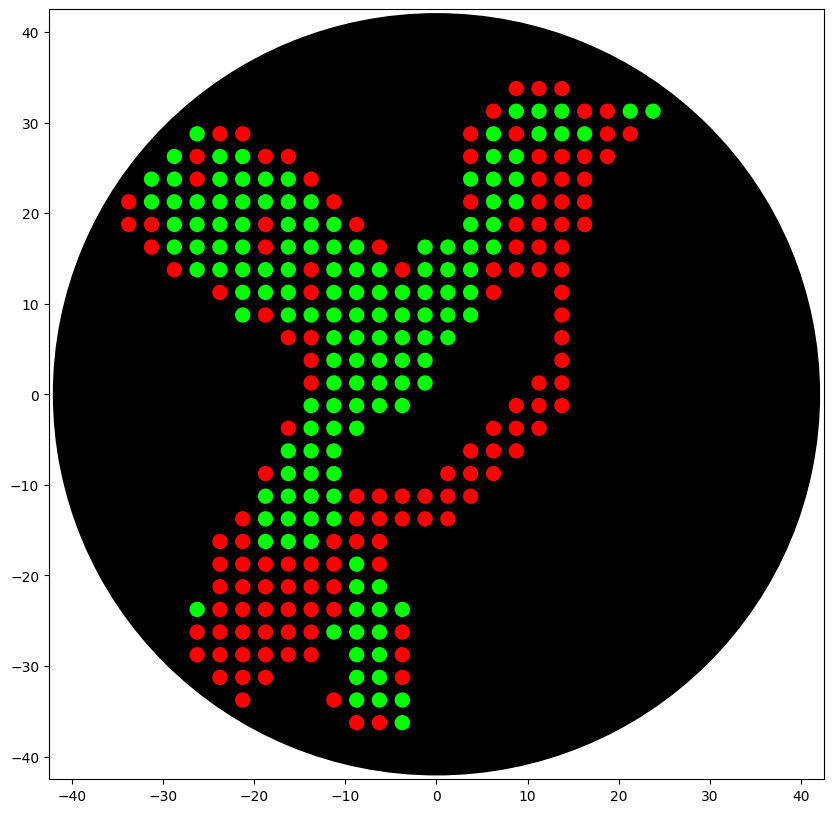
Figure 1. Opentrons Colab simulation of the two-color hummingbird agar art design. Red dots represent the mRFP1-producing bacterial culture and green dots represent the sfGFP-producing bacterial culture. The black circle represents the agar plate boundary.

Paper used for Post-Lab Q2
- Slowpoke: An Automated Golden Gate Cloning Workflow for Opentrons OT-2 and Flex (ACS Synthetic Biology)
- DOI: 10.1021/acssynbio.5c00629
- Link: https://pubs.acs.org/doi/10.1021/acssynbio.5c00629
Post-Lab Questions — Week 3 (Opentrons Artwork)
Q1) How would you use automation tools for your final project?
I plan to use automation (Opentrons OT-2 and/or cloud lab workflows) to accelerate the design-build-test-learn (DBTL) loop for a rapid biosensing platform aligned with my research interests (aptamers + CRISPR-based detection).
What I would automate:
- High-throughput reaction setup (96-well): systematic screening of buffer composition (Mg2+, salt, pH), reporter concentration, enzyme concentrations (Cas12/Cas13), and incubation time/temperature.
- Controls and calibration: automated no-target controls, positive controls, and dilution series to estimate LOD/LOQ and dynamic range.
- Matrix robustness: testing sensor performance in different sample matrices (buffer vs. complex matrices) and common interferents.
- Data capture and analysis: standardized plate-reader workflows + automated parsing/plotting scripts to compare conditions and select top-performing protocols.
Why automation matters:
- It reduces pipetting variability, improves reproducibility, and enables exploration of larger experimental design spaces with fewer manual errors.
- It makes protocols traceable and shareable as code (protocol + metadata), which supports reproducible science and scalability.
Success criteria:
- Faster iteration (more conditions tested per unit time) compared to manual setup.
- Improved reproducibility across replicates and across days.
- Identification of robust assay conditions that preserve sensitivity under realistic sample conditions.
Q2) Summarize one published paper that uses Opentrons / lab automation
Paper
- Title: Slowpoke: An Automated Golden Gate Cloning Workflow for Opentrons OT-2 and Flex
- Journal: ACS Synthetic Biology
- DOI: 10.1021/acssynbio.5c00629
- Link: https://pubs.acs.org/doi/10.1021/acssynbio.5c00629
Overview (Paragraph 1)
This paper introduces Slowpoke, an open-source, user-friendly automation workflow for Golden Gate-based cloning on the Opentrons OT-2 and Opentrons Flex. The motivation is that manual DNA assembly and downstream steps (transformation, plating, screening) become labor-intensive and error-prone at scale, and accessible automation can improve standardization and throughput while reducing hands-on time.
Overview (Paragraph 2)
Slowpoke automates major steps of the DNA assembly pipeline, including cloning, E. coli transformation, plating, and colony PCR, with user intervention primarily for colony picking and plate transfers. The authors also provide a free GUI (Streamlit app) to generate robot protocols through simple file uploads, lowering the barrier for users who do not want to write code manually. The full suite (code and templates) is made available as open source.
Key findings (Paragraph 3)
The workflow is validated using two Golden Gate toolkits: MoClo Yeast Toolkit (YTK) and SubtiToolKit (STK). Reported assembly outcomes include 17/17 positive colonies with YTK on OT-2, 11/12 on Flex, and 8/13 with STK on OT-2. For higher-throughput combinatorial assemblies on Flex (six-part assemblies), 55 out of 57 combinations resulted in correct constructs. Overall, the results support that affordable automation platforms can achieve robust cloning performance while improving reproducibility and scalability.
### Figures (1–2 maximum)
Suggested figures to include in your submission:
- A workflow schematic figure showing the end-to-end automated pipeline (assembly → transformation → plating → colony PCR).
- A results figure/table showing assembly success rates or validation outcomes across toolkits/platforms (including the high-throughput 55/57 result).
Week 3 — Questions Developed (Opentrons Artwork)
1) What are the core constraints for OT-2 agar art?
All coordinates are in millimeters, points must remain within a 40 mm radius from the center, and 1 µL drops are a safe default on black agar plates.
2) Why does spacing matter (e.g., 2.5 mm vs 3.5 o 5 mm)?
Smaller spacing increases resolution but increases the chance droplets merge; larger spacing reduces merging risk but lowers image detail.
3) What causes streaking and how do you prevent it?
If the tip moves laterally immediately after dispensing, it can drag liquid and create streaks. Using a dispense-and-detach motion (up/down) helps detach the droplet and reduces streaking.
4) Why use one tip per color?
Using one tip per color prevents cross-contamination of color wells and keeps fluorescence signals cleanly separated.
5) How do you minimize wasted reagents and time?
Aspirate in chunks (up to 20 µL for a P20) and only aspirate what you will dispense, while keeping tip usage minimal without cross-contaminating color wells.
6) What depends on TA calibration and why?
The agar plate labware calibration determines the true plate center location. If calibration is off, the entire pattern can shift and potentially hit the plate wall.
7) How did you validate your protocol before submission?
I ran the Colab simulator, confirmed the visualization matches the intended design, confirmed no “outside radius” errors, and ensured the protocol uses two tips (one per color).
8) What are the main failure modes to watch for?
Points outside radius, dot merging due to tight spacing, streaking due to motion, and permission issues (Colab link not shared as viewer).
Final Project Ideas Slide
For the Week 3 final project ideation assignment, I added my slide to the Committed Listener deck with my name, city, and country. The three ideas were:
- DNAzyme–Cas12a biosensor for lead detection in drinking water.
- Aptamer/CRISPR-based detection platform for viral biomarkers.
- Automated screening workflow for optimizing cell-free biosensor conditions.