Week 3 Lab: Opentrons Artwork
Overview
Pre-Lab Process
The idea of having to write my own code to create this art sounded terrifying at first given that I probably barely passed 6.100A. Then I found out a lot of it was written in Google Colab and felt relieved, until I kept running into issues so I decided to give up and just use Ronan’s code from his website: https://opentrons-art.rcdonovan.com/
The code can be found at the bottom.
Here’s my final draft:
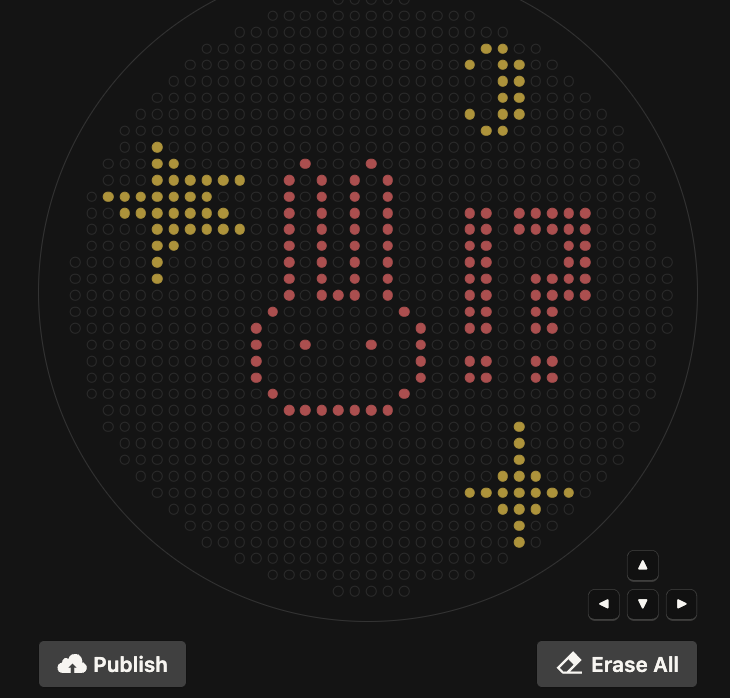
Coordinates:
mscarlet_i_points = [(-8.8, 17.6),(0, 17.6),(-11, 15.4),(-6.6, 15.4),(-2.2, 15.4),(2.2, 15.4),(-11, 13.2),(-6.6, 13.2),(-2.2, 13.2),(2.2, 13.2),(-11, 11),(-6.6, 11),(-2.2, 11),(2.2, 11),(13.2, 11),(15.4, 11),(19.8, 11),(22, 11),(24.2, 11),(26.4, 11),(28.6, 11),(-11, 8.8),(-6.6, 8.8),(-2.2, 8.8),(2.2, 8.8),(13.2, 8.8),(15.4, 8.8),(19.8, 8.8),(22, 8.8),(24.2, 8.8),(26.4, 8.8),(28.6, 8.8),(-11, 6.6),(-6.6, 6.6),(-2.2, 6.6),(2.2, 6.6),(13.2, 6.6),(15.4, 6.6),(26.4, 6.6),(28.6, 6.6),(-11, 4.4),(-6.6, 4.4),(-2.2, 4.4),(2.2, 4.4),(13.2, 4.4),(15.4, 4.4),(26.4, 4.4),(28.6, 4.4),(-11, 2.2),(-6.6, 2.2),(-2.2, 2.2),(2.2, 2.2),(13.2, 2.2),(15.4, 2.2),(22, 2.2),(24.2, 2.2),(26.4, 2.2),(28.6, 2.2),(-11, 0),(-6.6, 0),(-4.4, 0),(-2.2, 0),(2.2, 0),(13.2, 0),(15.4, 0),(22, 0),(24.2, 0),(26.4, 0),(28.6, 0),(-13.2, -2.2),(4.4, -2.2),(13.2, -2.2),(15.4, -2.2),(22, -2.2),(24.2, -2.2),(-15.4, -4.4),(6.6, -4.4),(13.2, -4.4),(15.4, -4.4),(22, -4.4),(24.2, -4.4),(-15.4, -6.6),(-8.8, -6.6),(0, -6.6),(6.6, -6.6),(-15.4, -8.8),(6.6, -8.8),(13.2, -8.8),(15.4, -8.8),(22, -8.8),(24.2, -8.8),(-15.4, -11),(6.6, -11),(13.2, -11),(15.4, -11),(22, -11),(24.2, -11),(-13.2, -13.2),(4.4, -13.2),(-11, -15.4),(-8.8, -15.4),(-6.6, -15.4),(-4.4, -15.4),(-2.2, -15.4),(0, -15.4),(2.2, -15.4)]
mko2_points = [(15.4, 33),(17.6, 33),(13.2, 30.8),(17.6, 30.8),(19.8, 30.8),(17.6, 28.6),(19.8, 28.6),(17.6, 26.4),(19.8, 26.4),(13.2, 24.2),(17.6, 24.2),(19.8, 24.2),(15.4, 22),(17.6, 22),(-28.6, 19.8),(-28.6, 17.6),(-26.4, 17.6),(-28.6, 15.4),(-26.4, 15.4),(-24.2, 15.4),(-22, 15.4),(-19.8, 15.4),(-17.6, 15.4),(-35.2, 13.2),(-33, 13.2),(-30.8, 13.2),(-28.6, 13.2),(-26.4, 13.2),(-24.2, 13.2),(-22, 13.2),(-33, 11),(-30.8, 11),(-28.6, 11),(-26.4, 11),(-24.2, 11),(-22, 11),(-19.8, 11),(-28.6, 8.8),(-26.4, 8.8),(-24.2, 8.8),(-22, 8.8),(-19.8, 8.8),(-17.6, 8.8),(-28.6, 6.6),(-26.4, 6.6),(-28.6, 4.4),(-28.6, 2.2),(19.8, -17.6),(19.8, -19.8),(19.8, -22),(17.6, -24.2),(19.8, -24.2),(22, -24.2),(13.2, -26.4),(15.4, -26.4),(17.6, -26.4),(19.8, -26.4),(22, -26.4),(24.2, -26.4),(26.4, -26.4),(17.6, -28.6),(19.8, -28.6),(22, -28.6),(19.8, -30.8),(19.8, -33)]
During the Lab
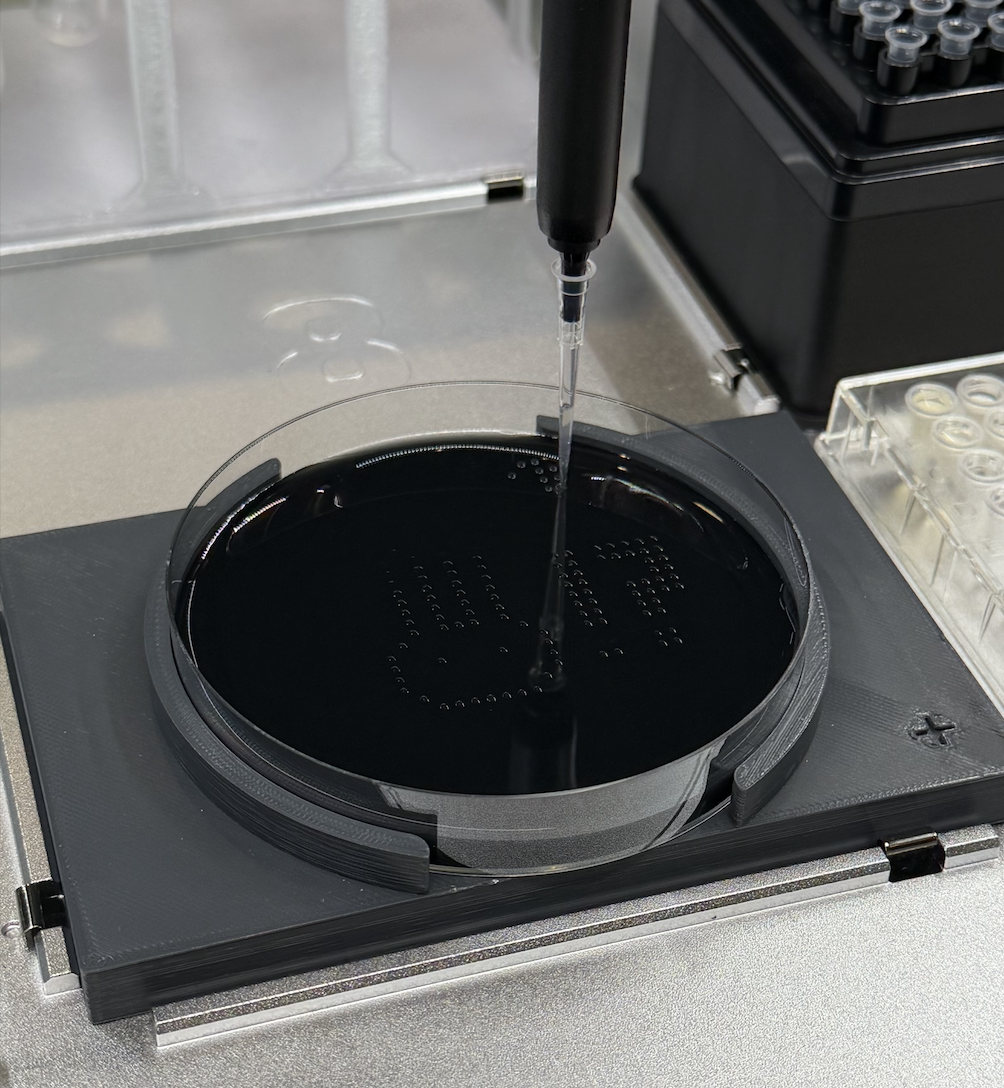
This was a pretty chill session. To be honest, I don’t know the details of how running the program works, but I was allowed to hit the start button! It was fascinating watching the robot do it’s thing. Because people came before me, if there was any troubleshooting that had to go on, it was done by the time I arrived.
Post Lab
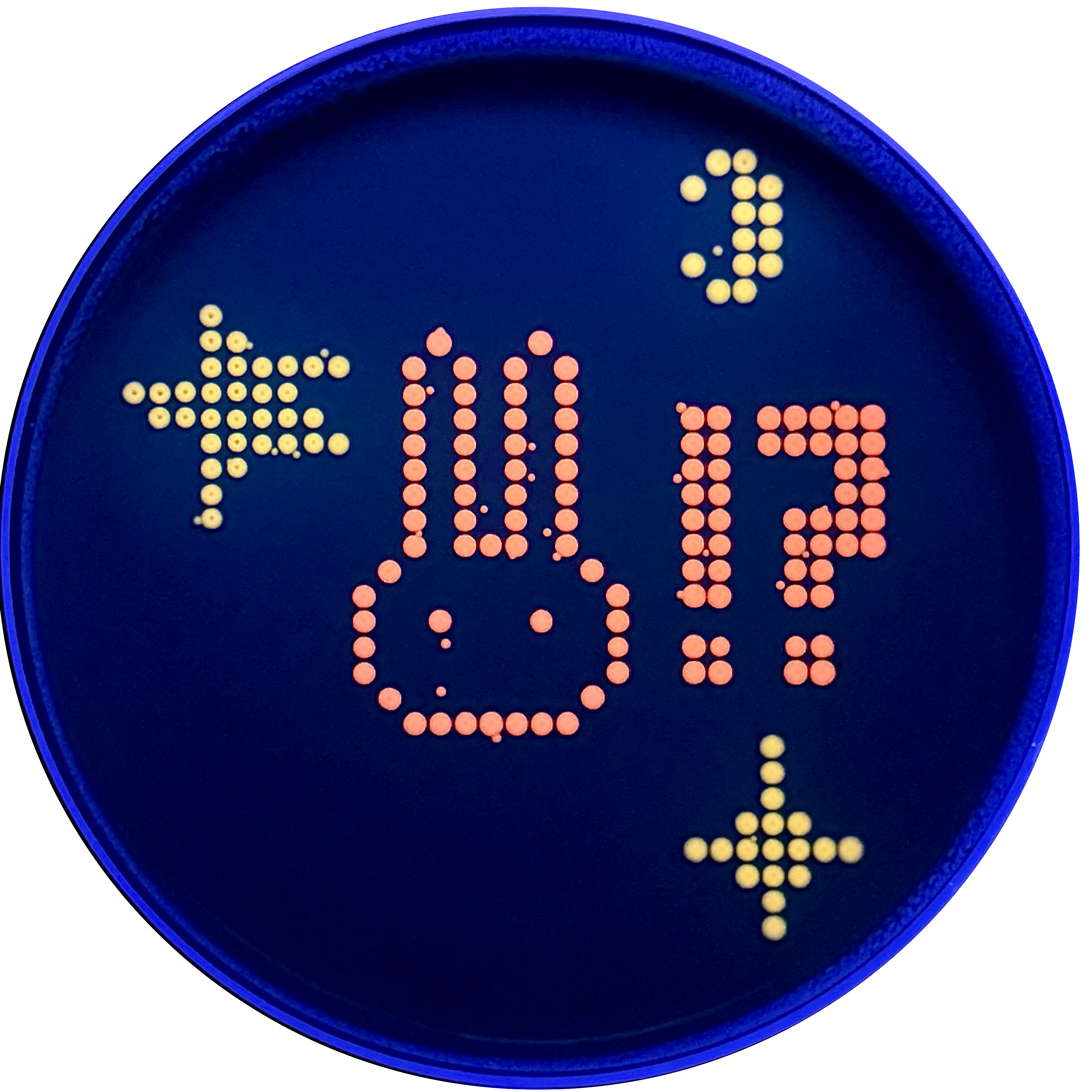
My design turned out super cute! I’m not super sure why there are tiny dots that appeared which don’t pertain to my design, perhaps this is contamination?
Post-Lab Reflection
I think I’m a materials major for a reason.
Code:
from opentrons import types

import string

metadata = {
    'protocolName': '{YOUR NAME} - Opentrons Art - HTGAA',
    'author': 'HTGAA',
    'source': 'HTGAA 2026',
    'apiLevel': '2.20'
}

Z_VALUE_AGAR = 2.0
POINT_SIZE = 0.75

mscarlet_i_points = [(-8.8,17.6), (0,17.6), (-11,15.4), (-6.6,15.4), (-2.2,15.4), (2.2,15.4), (-11,13.2), (-6.6,13.2), (-2.2,13.2), (2.2,13.2), (-11,11), (-6.6,11), (-2.2,11), (2.2,11), (13.2,11), (15.4,11), (19.8,11), (22,11), (24.2,11), (26.4,11), (28.6,11), (-11,8.8), (-6.6,8.8), (-2.2,8.8), (2.2,8.8), (13.2,8.8), (15.4,8.8), (19.8,8.8), (22,8.8), (24.2,8.8), (26.4,8.8), (28.6,8.8), (-11,6.6), (-6.6,6.6), (-2.2,6.6), (2.2,6.6), (13.2,6.6), (15.4,6.6), (26.4,6.6), (28.6,6.6), (-11,4.4), (-6.6,4.4), (-2.2,4.4), (2.2,4.4), (13.2,4.4), (15.4,4.4), (26.4,4.4), (28.6,4.4), (-11,2.2), (-6.6,2.2), (-2.2,2.2), (2.2,2.2), (13.2,2.2), (15.4,2.2), (22,2.2), (24.2,2.2), (26.4,2.2), (28.6,2.2), (-11,0), (-6.6,0), (-4.4,0), (-2.2,0), (2.2,0), (13.2,0), (15.4,0), (22,0), (24.2,0), (26.4,0), (28.6,0), (-13.2,-2.2), (4.4,-2.2), (13.2,-2.2), (15.4,-2.2), (22,-2.2), (24.2,-2.2), (-15.4,-4.4), (6.6,-4.4), (13.2,-4.4), (15.4,-4.4), (22,-4.4), (24.2,-4.4), (-15.4,-6.6), (-8.8,-6.6), (0,-6.6), (6.6,-6.6), (-15.4,-8.8), (6.6,-8.8), (13.2,-8.8), (15.4,-8.8), (22,-8.8), (24.2,-8.8), (-15.4,-11), (6.6,-11), (13.2,-11), (15.4,-11), (22,-11), (24.2,-11), (-13.2,-13.2), (4.4,-13.2), (-11,-15.4), (-8.8,-15.4), (-6.6,-15.4), (-4.4,-15.4), (-2.2,-15.4), (0,-15.4), (2.2,-15.4)]
mko2_points = [(15.4,33), (17.6,33), (13.2,30.8), (17.6,30.8), (19.8,30.8), (17.6,28.6), (19.8,28.6), (17.6,26.4), (19.8,26.4), (13.2,24.2), (17.6,24.2), (19.8,24.2), (15.4,22), (17.6,22), (-28.6,19.8), (-28.6,17.6), (-26.4,17.6), (-28.6,15.4), (-26.4,15.4), (-24.2,15.4), (-22,15.4), (-19.8,15.4), (-17.6,15.4), (-35.2,13.2), (-33,13.2), (-30.8,13.2), (-28.6,13.2), (-26.4,13.2), (-24.2,13.2), (-22,13.2), (-33,11), (-30.8,11), (-28.6,11), (-26.4,11), (-24.2,11), (-22,11), (-19.8,11), (-28.6,8.8), (-26.4,8.8), (-24.2,8.8), (-22,8.8), (-19.8,8.8), (-17.6,8.8), (-28.6,6.6), (-26.4,6.6), (-28.6,4.4), (-28.6,2.2), (19.8,-17.6), (19.8,-19.8), (19.8,-22), (17.6,-24.2), (19.8,-24.2), (22,-24.2), (13.2,-26.4), (15.4,-26.4), (17.6,-26.4), (19.8,-26.4), (22,-26.4), (24.2,-26.4), (26.4,-26.4), (17.6,-28.6), (19.8,-28.6), (22,-28.6), (19.8,-30.8), (19.8,-33)]

point_name_pairing = [("mscarlet_i", mscarlet_i_points),("mko2", mko2_points)]

# Robot deck setup constants
TIP_RACK_DECK_SLOT = 9
COLORS_DECK_SLOT = 6
AGAR_DECK_SLOT = 5
PIPETTE_STARTING_TIP_WELL = 'A1'

# Place the PCR tubes in this order
well_colors = {
    'A1': 'sfGFP',
    'A2': 'mRFP1',
    'A3': 'mKO2',
    'A4': 'Venus',
    'A5': 'mKate2_TF',
    'A6': 'Azurite',
    'A7': 'mCerulean3',
    'A8': 'mClover3',
    'A9': 'mJuniper',
    'A10': 'mTurquoise2',
    'A11': 'mBanana',
    'A12': 'mPlum',
    'B1': 'Electra2',
    'B2': 'mWasabi',
    'B3': 'mScarlet_I',
    'B4': 'mPapaya',
    'B5': 'eqFP578',
    'B6': 'tdTomato',
    'B7': 'DsRed',
    'B8': 'mKate2',
    'B9': 'EGFP',
    'B10': 'mRuby2',
    'B11': 'TagBFP',
    'B12': 'mChartreuse_TF',
    'C1': 'mLychee_TF',
    'C2': 'mTagBFP2',
    'C3': 'mEGFP',
    'C4': 'mNeonGreen',
    'C5': 'mAzamiGreen',
    'C6': 'mWatermelon',
    'C7': 'avGFP',
    'C8': 'mCitrine',
    'C9': 'mVenus',
    'C10': 'mCherry',
    'C11': 'mHoneydew',
    'C12': 'TagRFP',
    'D1': 'mTFP1',
    'D2': 'Ultramarine',
    'D3': 'ZsGreen1',
    'D4': 'mMiCy',
    'D5': 'mStayGold2',
    'D6': 'PA_GFP'
}

volume_used = {
    'mscarlet_i': 0,
    'mko2': 0
}

def update_volume_remaining(current_color, quantity_to_aspirate):
    rows = string.ascii_uppercase
    for well, color in list(well_colors.items()):
        if color == current_color:
            if (volume_used[current_color] + quantity_to_aspirate) > 250:
                # Move to next well horizontally by advancing row letter, keeping column number
                row = well[0]
                col = well[1:]

                # Find next row letter
                next_row = rows[rows.index(row) + 1]
                next_well = f"{next_row}{col}"

                del well_colors[well]
                well_colors[next_well] = current_color
                volume_used[current_color] = quantity_to_aspirate
            else:
                volume_used[current_color] += quantity_to_aspirate
            break

def run(protocol):
    # Load labware, modules and pipettes
    protocol.home()

    # Tips
    tips_20ul = protocol.load_labware('opentrons_96_tiprack_20ul', TIP_RACK_DECK_SLOT, 'Opentrons 20uL Tips')

    # Pipettes
    pipette_20ul = protocol.load_instrument("p20_single_gen2", "right", [tips_20ul])

    # PCR Plate
    temperature_plate = protocol.load_labware('opentrons_96_aluminumblock_generic_pcr_strip_200ul', 6)

    # Agar Plate
    agar_plate = protocol.load_labware('htgaa_agar_plate', AGAR_DECK_SLOT, 'Agar Plate')
    agar_plate.set_offset(x=0.00, y=0.00, z=Z_VALUE_AGAR)

    # Get the top-center of the plate, make sure the plate was calibrated before running this
    center_location = agar_plate['A1'].top()

    pipette_20ul.starting_tip = tips_20ul.well(PIPETTE_STARTING_TIP_WELL)

    # Helper function (dispensing)
    def dispense_and_jog(pipette, volume, location):
        assert(isinstance(volume, (int, float)))
        # Go above the location
        above_location = location.move(types.Point(z=location.point.z + 2))
        pipette.move_to(above_location)
        # Go downwards and dispense
        pipette.dispense(volume, location)
        # Go upwards to avoid smearing
        pipette.move_to(above_location)

    # Helper function (color location)
    def location_of_color(color_string):
        for well,color in well_colors.items():
            if color.lower() == color_string.lower():
                return temperature_plate[well]
        raise ValueError(f"No well found with color {color_string}")

    # Print pattern by iterating over lists
    for i, (current_color, point_list) in enumerate(point_name_pairing):
        # Skip the rest of the loop if the list is empty
        if not point_list:
            continue

        # Get the tip for this run, set the bacteria color, and the aspirate bacteria of choice
        pipette_20ul.pick_up_tip()
        max_aspirate = int(18 // POINT_SIZE) * POINT_SIZE
        quantity_to_aspirate = min(len(point_list)*POINT_SIZE, max_aspirate)
        update_volume_remaining(current_color, quantity_to_aspirate)
        pipette_20ul.aspirate(quantity_to_aspirate, location_of_color(current_color))

        # Iterate over the current points list and dispense them, refilling along the way
        for i in range(len(point_list)):
            x, y = point_list[i]
            adjusted_location = center_location.move(types.Point(x, y))

            dispense_and_jog(pipette_20ul, POINT_SIZE, adjusted_location)

            if pipette_20ul.current_volume == 0 and len(point_list[i+1:]) > 0:
                quantity_to_aspirate = min(len(point_list[i:])*POINT_SIZE, max_aspirate)
                update_volume_remaining(current_color, quantity_to_aspirate)
                pipette_20ul.aspirate(quantity_to_aspirate, location_of_color(current_color))

        # Drop tip between each color
        pipette_20ul.drop_tip()