Week 3 HW: Lab Automation
Assignment: Python Script for Opentrons Artwork
Your task this week is to Create a Python file to run on an Opentrons liquid handling robot.
- Review this week’s recitation and this week’s lab for details on the Opentrons and programming it.
- Generate an artistic design using the GUI at opentrons-art.rcdonovan.com.
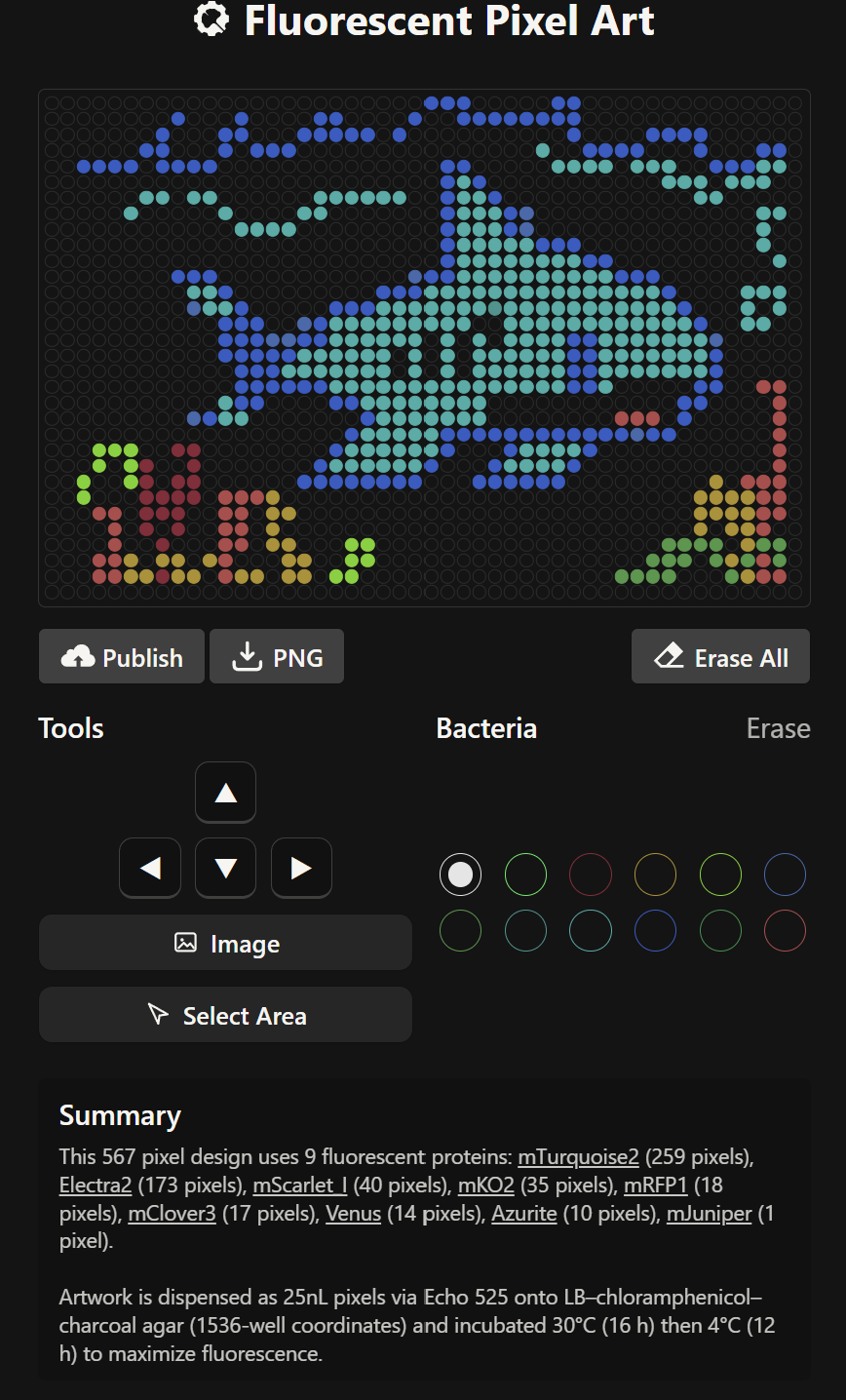
During this stage, the Fluorescent Pixel Art tool was used to create the desired design. However, after completing the design, I encountered significant difficulties when trying to download its coordinates. As a result, the coordinate mapping had to be carried out manually, with the assistance of artificial intelligence. To make the process more manageable, I ultimately opted for a simpler design.
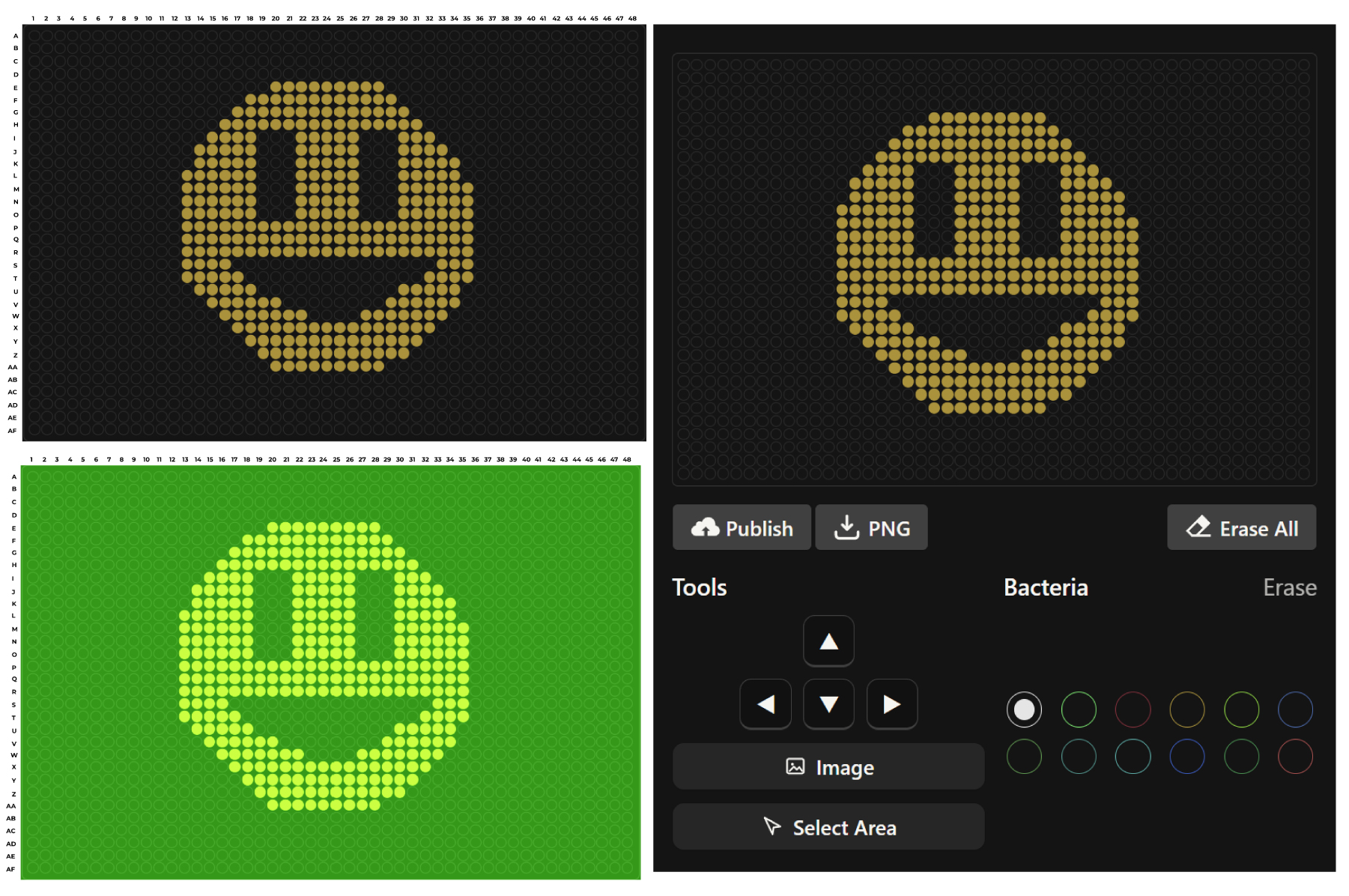
Final Coordinates
mko2_points = [‘E20’,‘E21’,‘E22’,‘E23’,‘E24’,‘E25’,‘E26’,‘E27’,‘F18’,‘F19’,‘F20’,‘F21’,‘F22’,‘F23’,‘F24’,‘F25’,‘F26’,‘F27’,‘F28’,‘F29’,‘G17’,‘G18’,‘G19’,‘G20’,‘G21’,‘G22’,‘G23’,‘G24’,‘G25’,‘G26’,‘G27’,‘G28’,‘G29’,‘G30’,‘H16’,‘H17’,‘H18’,‘H19’,‘H20’,‘H21’,‘H22’,‘H23’,‘H24’,‘H25’,‘H26’,‘H27’,‘H28’,‘H29’,‘H30’,‘H31’,‘I15’,‘I16’,‘I17’,‘I21’,‘I22’,‘I23’,‘I24’,‘I25’,‘I26’,‘I27’,‘I28’,‘I32’,‘I33’,‘I34’,‘J15’,‘J16’,‘J17’,‘J21’,‘J22’,‘J23’,‘J24’,‘J25’,‘J26’,‘J27’,‘J28’,‘J32’,‘J33’,‘J34’,‘K15’,‘K16’,‘K17’,‘K21’,‘K22’,‘K23’,‘K24’,‘K25’,‘K26’,‘K27’,‘K28’,‘K32’,‘K33’,‘K34’,‘L14’,‘L15’,‘L16’,‘L17’,‘L21’,‘L22’,‘L23’,‘L24’,‘L25’,‘L26’,‘L27’,‘L28’,‘L32’,‘L33’,‘L34’,‘L35’,‘M14’,‘M15’,‘M16’,‘M17’,‘M21’,‘M22’,‘M23’,‘M24’,‘M25’,‘M26’,‘M27’,‘M28’,‘M32’,‘M33’,‘M34’,‘M35’,‘N14’,‘N15’,‘N16’,‘N17’,‘N21’,‘N22’,‘N23’,‘N24’,‘N25’,‘N26’,‘N27’,‘N28’,‘N32’,‘N33’,‘N34’,‘N35’,‘O14’,‘O15’,‘O16’,‘O17’,‘O21’,‘O22’,‘O23’,‘O24’,‘O25’,‘O26’,‘O27’,‘O28’,‘O32’,‘O33’,‘O34’,‘O35’,‘P14’,‘P15’,‘P16’,‘P17’,‘P18’,‘P19’,‘P20’,‘P21’,‘P22’,‘P23’,‘P24’,‘P25’,‘P26’,‘P27’,‘P28’,‘P29’,‘P30’,‘P31’,‘P32’,‘P33’,‘P34’,‘P35’,‘Q14’,‘Q15’,‘Q16’,‘Q17’,‘Q18’,‘Q19’,‘Q20’,‘Q21’,‘Q22’,‘Q23’,‘Q24’,‘Q25’,‘Q26’,‘Q27’,‘Q28’,‘Q29’,‘Q30’,‘Q31’,‘Q32’,‘Q33’,‘Q34’,‘Q35’,‘R15’,‘R16’,‘R17’,‘R18’,‘R19’,‘R20’,‘R21’,‘R22’,‘R23’,‘R24’,‘R25’,‘R26’,‘R27’,‘R28’,‘R29’,‘R30’,‘R31’,‘R32’,‘R33’,‘R34’,‘S15’,‘S16’,‘S17’,‘S32’,‘S33’,‘S34’,‘T16’,‘T17’,‘T18’,‘T31’,‘T32’,‘T33’,‘U17’,‘U18’,‘U19’,‘U20’,‘U29’,‘U30’,‘U31’,‘U32’,‘V18’,‘V19’,‘V20’,‘V21’,‘V22’,‘V27’,‘V28’,‘V29’,‘V30’,‘V31’,‘W19’,‘W20’,‘W21’,‘W22’,‘W23’,‘W24’,‘W25’,‘W26’,‘W27’,‘W28’,‘W29’,‘W30’,‘X20’,‘X21’,‘X22’,‘X23’,‘X24’,‘X25’,‘X26’,‘X27’,‘X28’,‘X29’,‘Y21’,‘Y22’,‘Y23’,‘Y24’,‘Y25’,‘Y26’,‘Y27’,‘Y28’,‘Z22’,‘Z23’,‘Z24’,‘Z25’,‘Z26’,‘Z27’,‘AA23’,‘AA24’,‘AA25’,‘AA26’]
- Using the coordinates from the GUI, follow the instructions in the HTGAA26 Opentrons Colab to write your own Python script which draws your design using the Opentrons. You may use AI assistance for this coding — Google Gemini is integrated into Colab (see the stylized star bottom center); it will do a good job writing functional Python, while you probably need to take charge of the art concept. If you’re a proficient programmer and you’d rather code something mathematical or algorithmic instead of using your GUI coordinates, you may do that instead.
During this stage of the task, we were asked to develop code capable of simulating the application of our design within a controlled environment in a Petri dish. However, this required prior knowledge of Python, and since this was my first experience working with the language, I found it quite challenging. To overcome this difficulty, I decided to rely on the assistance of artificial intelligence to help generate the code needed for the simulation. I provided the necessary parameters and requirements to ensure that the experiment could be carried out successfully and that the simulation would run without errors.
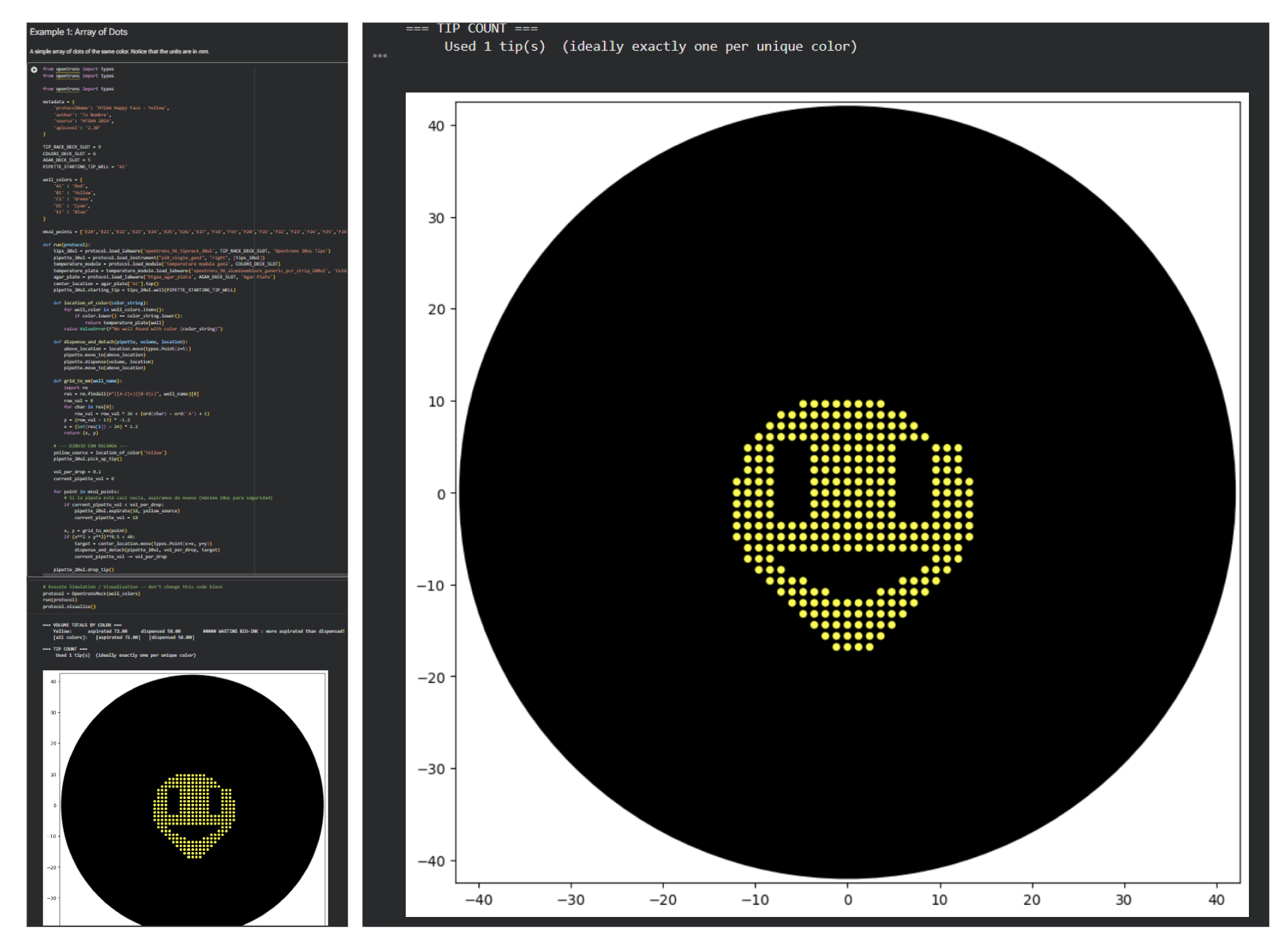
Considering that the coordinates had to be obtained manually, some misalignments were present in the final design. However, the overall morphology and core structure were preserved, which suggests that the intended design was successfully captured. This outcome also opens the possibility of progressively experimenting with more complex designs in the future.
Post-Lab Questions
For this week, we’d like for you to do the following:
Find and describe a published paper that utilizes the Opentrons or an automation tool to achieve novel biological applications.
Write a description about what you intend to do with automation tools for your final project. You may include example pseudocode, Python scripts, 3D printed holders, a plan for how to use Ginkgo Nebula, and more. You may reference this week’s recitation slide deck for lab automation details. While your description/project idea doesn’t need to be set in stone, we would like to see core details of what you would automate. This is due at the start of lecture and does not need to be tested on the Opentrons yet.
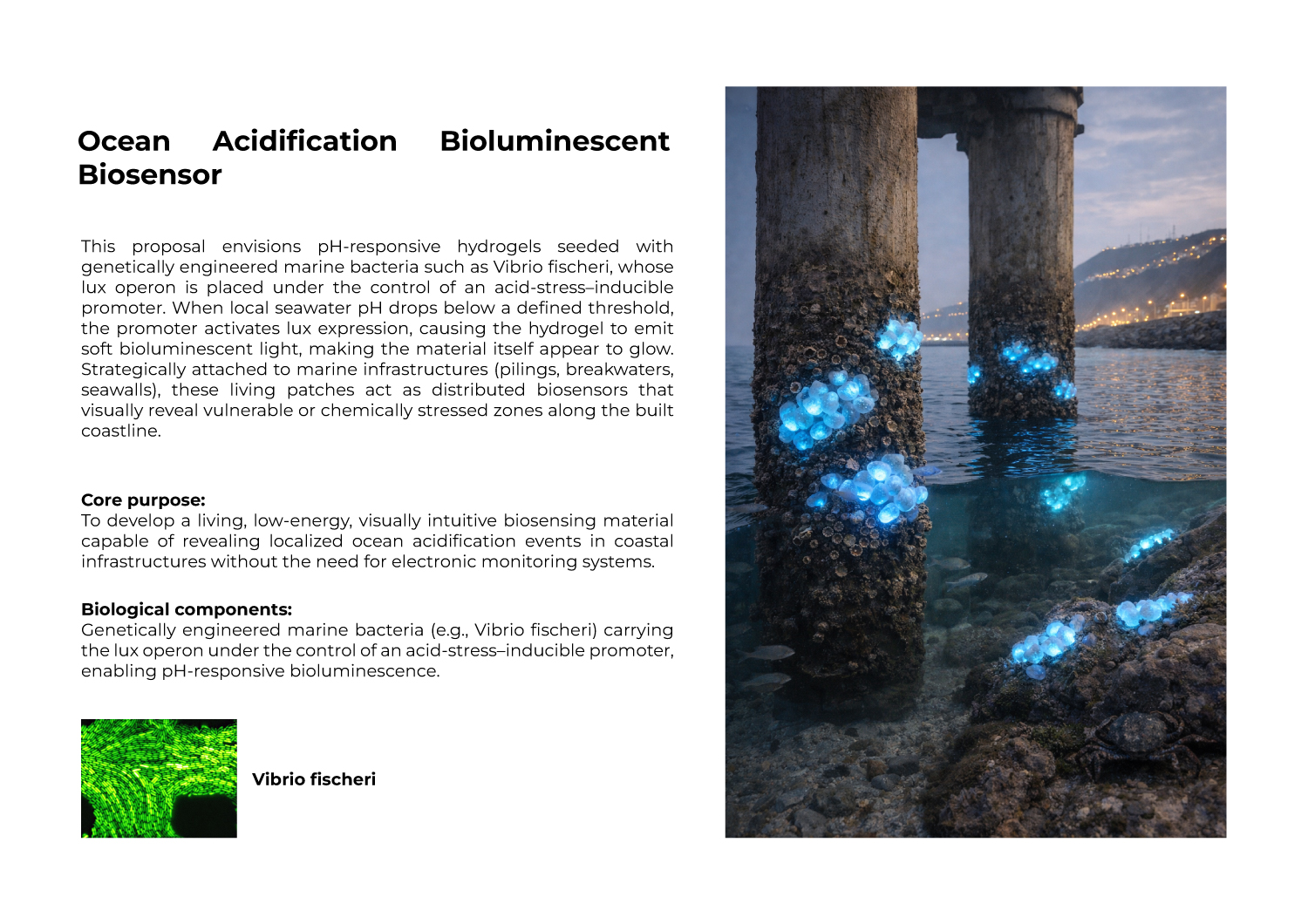
Project Name: Ocean Acidification Bioluminescent Biosensor.
Description: My project proposal is about a pH-responsive hydrogel with genetically engineered bacteria (Vibrio fischeri). When the ocean pH drops below a threshold, the bacteria should emit bioluminescent light. The core purpose is to have visually intuitive biosensors for local ocean acidification events.
I intend to use the Opentrons robot to automate the testing of this material. First, I will have a petri dish with the hydrogel and the bacteria already inside. Then, I will use the robot to:
Prepare pH Samples: The robot will create a set of small tubes with different seawater pH levels (like 8.1, 7.8, 7.5, 7.2, 6.9).
Add Tiny Drops: The robot will pick up a tiny drop (0.2 µL) from each tube and dispense it onto different spots of the hydrogel.
Create a Map of Light: Since the robot knows the exact location and pH of each drop, I can observe exactly where the hydrogel glows and where it does not. This will help me find the best pH threshold for my material.
Final Project Ideas