Week 03 HW: Lab Automation
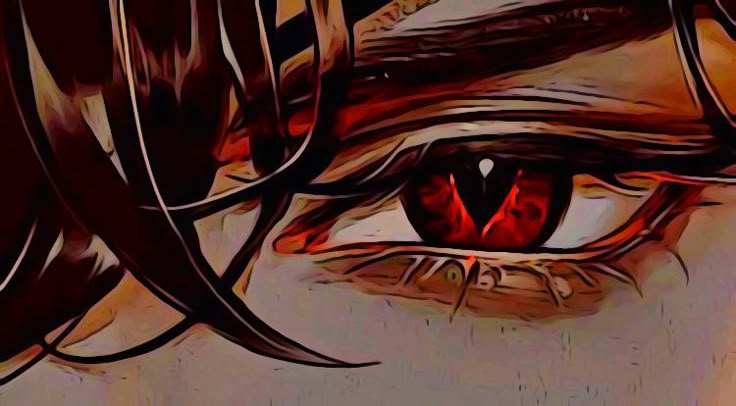
Part 01: Opentron python file to create a image. Here is my code for the image below alongwith the prerequisitve codes before and after the - I used Sonnet 4.6 for the task.
from opentrons import types
metadata = { ‘author’: ’tanishka’, ‘protocolName’: ‘recreate img of an eye’, ‘description’: ‘’, ‘source’: ‘HTGAA 2026 Opentrons Lab’, ‘apiLevel’: ‘2.20’ }
##############################################################################
Robot deck setup constants - don’t change these
##############################################################################
TIP_RACK_DECK_SLOT = 9 COLORS_DECK_SLOT = 6 AGAR_DECK_SLOT = 5 PIPETTE_STARTING_TIP_WELL = ‘A1’
well_colors = { ‘B1’ : ‘Red’, ‘A1’ : ‘Orange’, ‘C1’ : ‘Green’ }
def run(protocol): ##############################################################################
Load labware, modules and pipettes
##############################################################################
Tips
tips_20ul = protocol.load_labware(‘opentrons_96_tiprack_20ul’, TIP_RACK_DECK_SLOT, ‘Opentrons 20uL Tips’)
Pipettes
pipette_20ul = protocol.load_instrument(“p20_single_gen2”, “right”, [tips_20ul])
Modules
temperature_module = protocol.load_module(’temperature module gen2’, COLORS_DECK_SLOT)
Temperature Module Plate
temperature_plate = temperature_module.load_labware(‘opentrons_96_aluminumblock_generic_pcr_strip_200ul’, ‘Cold Plate’)
Choose where to take the colors from
color_plate = temperature_plate
Agar Plate
agar_plate = protocol.load_labware(‘htgaa_agar_plate’, AGAR_DECK_SLOT, ‘Agar Plate’) center_location = agar_plate[‘A1’].top()
pipette_20ul.starting_tip = tips_20ul.well(PIPETTE_STARTING_TIP_WELL)
##############################################################################
Patterning
##############################################################################
def location_of_color(color_string): for well, color in well_colors.items(): if color.lower() == color_string.lower(): return color_plate[well] raise ValueError(f"No well found with color {color_string}")
def dispense_and_detach(pipette, volume, location): assert(isinstance(volume, (int, float))) above_location = location.move(types.Point(z=location.point.z + 5)) pipette.move_to(above_location) pipette.dispense(volume, location) pipette.move_to(above_location)
YOUR CODE HERE
WELL_SPACING_MM = 2.25 SAFE_RADIUS_MM = 38.0
row_order = [ ‘A’,‘B’,‘C’,‘D’,‘E’,‘F’,‘G’,‘H’,‘I’,‘J’,‘K’,‘L’,‘M’,‘N’,‘O’,‘P’, ‘Q’,‘R’,‘S’,‘T’,‘U’,‘V’,‘W’,‘X’,‘Y’,‘Z’,‘AA’,‘AB’,‘AC’,‘AD’,‘AE’,‘AF’ ]
MAX_EXTENT = 48 * WELL_SPACING_MM / 2 SCALE = SAFE_RADIUS_MM / MAX_EXTENT
def well_to_xy(well_str): col_str = ‘’.join(filter(str.isdigit, well_str)) row_str = ‘’.join(filter(str.isalpha, well_str)) col = int(col_str) row = row_order.index(row_str) x = (col - 24.5) * WELL_SPACING_MM * SCALE y = (16 - row) * WELL_SPACING_MM * SCALE return x, y
F1 source wells - dark red outline
red_wells_F1 = [ ‘AB4’,‘AB5’,‘AB6’,‘AB7’,‘AB8’,‘AB9’,‘AB10’,‘AB11’,‘AB16’,‘AB17’, ‘AB19’,‘AB20’,‘AB21’,‘AB22’,‘AB23’,‘AB24’,‘AB25’,‘AB26’,‘AB29’,‘AB32’, ‘AB35’,‘AB41’,‘AB43’,‘AB44’,‘AB45’, ‘AA4’,‘AA5’,‘AA6’,‘AA7’,‘AA8’,‘AA9’,‘AA10’,‘AA11’,‘AA15’,‘AA16’, ‘AA17’,‘AA18’,‘AA19’,‘AA20’,‘AA21’,‘AA25’,‘AA32’,‘AA36’,‘AA38’,‘AA39’, ‘AA43’,‘AA44’,‘AA45’, ‘Z4’,‘Z5’,‘Z6’,‘Z7’,‘Z13’,‘Z15’,‘Z16’,‘Z17’,‘Z18’,‘Z19’,‘Z20’,‘Z21’, ‘Z25’,‘Z26’,‘Z28’,‘Z43’,‘Z44’,‘Z45’, ‘Y7’,‘Y8’,‘Y9’,‘Y10’,‘Y15’,‘Y16’,‘Y17’,‘Y22’,‘Y23’,‘Y25’,‘Y26’,‘Y27’, ‘Y43’,‘Y44’,‘Y45’, ‘X9’,‘X10’,‘X11’,‘X20’,‘X21’,‘X22’,‘X23’,‘X25’,‘X27’,‘X44’,‘X45’, ‘W19’,‘W20’,‘W21’,‘W22’,‘W23’,‘W42’,‘W43’,‘W44’,‘W45’, ‘V18’,‘V19’,‘V20’,‘V21’,‘V22’,‘V23’,‘V25’,‘V43’,‘V44’,‘V45’, ‘U18’,‘U19’,‘U20’,‘U31’,‘U33’,‘U44’,‘U45’, ‘T4’,‘T16’,‘T18’,‘T19’,‘T20’,‘T21’,‘T30’,‘T32’,‘T34’,‘T45’, ‘S9’,‘S15’,‘S16’,‘S17’,‘S22’,‘S35’,‘S36’,‘S45’, ‘R15’,‘R17’,‘R19’,‘R24’,‘R25’,‘R26’,‘R27’,‘R36’,‘R37’,‘R38’,‘R43’, ‘Q18’,‘Q20’,‘Q26’,‘Q30’,‘Q37’,‘Q38’,‘Q39’, ‘P16’,‘P33’,‘P38’,‘P40’, ‘N20’,‘M9’,‘M27’,‘L9’,‘L30’,‘L32’,‘L33’,‘L34’, ‘K9’,‘K11’,‘K31’,‘K32’,‘K33’,‘K34’,‘K45’, ‘J34’,‘J37’,‘I17’,‘I43’,‘H44’,‘H45’,‘G10’,‘G16’, ‘F27’,‘F28’,‘E18’,‘E29’,‘E30’,‘E31’,‘E32’ ]
C1 source wells - light orange/skin tone fill
red_wells_C1 = [ ‘AB12’,‘AB13’,‘AB14’,‘AB15’,‘AB18’,‘AB27’,‘AB28’,‘AB30’,‘AB31’, ‘AB33’,‘AB34’,‘AB36’,‘AB37’,‘AB38’,‘AB39’,‘AB40’,‘AB42’, ‘AA12’,‘AA13’,‘AA14’,‘AA22’,‘AA23’,‘AA24’,‘AA26’,‘AA27’,‘AA28’, ‘AA29’,‘AA30’,‘AA31’,‘AA33’,‘AA34’,‘AA35’,‘AA37’,‘AA40’,‘AA41’,‘AA42’, ‘Z8’,‘Z9’,‘Z10’,‘Z11’,‘Z12’,‘Z14’,‘Z22’,‘Z23’,‘Z24’,‘Z27’,‘Z29’, ‘Z30’,‘Z31’,‘Z32’,‘Z33’,‘Z34’,‘Z35’,‘Z36’,‘Z37’,‘Z38’,‘Z39’,‘Z40’,‘Z41’,‘Z42’, ‘Y5’,‘Y12’,‘Y13’,‘Y14’,‘Y19’,‘Y20’,‘Y24’,‘Y28’,‘Y29’,‘Y30’,‘Y31’, ‘Y32’,‘Y33’,‘Y34’,‘Y35’,‘Y36’,‘Y37’,‘Y38’,‘Y39’,‘Y40’,‘Y41’,‘Y42’, ‘X6’,‘X8’,‘X12’,‘X14’,‘X15’,‘X16’,‘X18’,‘X24’,‘X26’,‘X28’,‘X29’, ‘X30’,‘X31’,‘X32’,‘X33’,‘X34’,‘X35’,‘X36’,‘X37’,‘X38’,‘X39’,‘X40’,‘X41’,‘X42’,‘X43’, ‘W8’,‘W9’,‘W10’,‘W11’,‘W12’,‘W13’,‘W17’,‘W18’,‘W24’,‘W25’,‘W26’, ‘W27’,‘W28’,‘W29’,‘W30’,‘W31’,‘W32’,‘W33’,‘W34’,‘W35’,‘W36’,‘W37’,‘W38’,‘W39’,‘W40’,‘W41’, ‘V9’,‘V10’,‘V11’,‘V12’,‘V13’,‘V16’,‘V17’,‘V24’,‘V26’,‘V27’,‘V28’, ‘V29’,‘V30’,‘V31’,‘V32’,‘V33’,‘V34’,‘V35’,‘V36’,‘V37’,‘V38’,‘V39’,‘V40’,‘V41’,‘V42’, ‘U5’,‘U8’,‘U10’,‘U11’,‘U15’,‘U17’,‘U21’,‘U22’,‘U23’,‘U24’,‘U25’, ‘U26’,‘U27’,‘U28’,‘U29’,‘U30’,‘U32’,‘U34’,‘U35’,‘U36’,‘U37’,‘U38’,‘U39’,‘U40’,‘U41’,‘U42’,‘U43’, ‘T6’,‘T7’,‘T9’,‘T10’,‘T11’,‘T22’,‘T23’,‘T24’,‘T25’,‘T26’,‘T27’, ‘T28’,‘T31’,‘T33’,‘T35’,‘T36’,‘T37’,‘T38’,‘T39’,‘T40’,‘T41’,‘T42’,‘T43’,‘T44’, ‘S7’,‘S8’,‘S18’,‘S19’,‘S20’,‘S21’,‘S23’,‘S24’,‘S25’,‘S26’,‘S27’, ‘S28’,‘S32’,‘S33’,‘S37’,‘S38’,‘S39’,‘S41’,‘S42’,‘S43’,‘S44’, ‘R5’,‘R8’,‘R16’,‘R20’,‘R21’,‘R22’,‘R23’,‘R30’,‘R32’,‘R33’,‘R34’, ‘R39’,‘R40’,‘R41’,‘R42’,‘R44’,‘R45’, ‘Q7’,‘Q16’,‘Q17’,‘Q21’,‘Q24’,‘Q25’,‘Q29’,‘Q32’,‘Q34’,‘Q35’,‘Q36’, ‘Q40’,‘Q41’,‘Q42’,‘Q43’,‘Q44’,‘Q45’, ‘P21’,‘P25’,‘P26’,‘P28’,‘P29’,‘P34’,‘P35’,‘P37’,‘P39’,‘P41’,‘P43’,‘P44’,‘P45’, ‘O6’,‘O12’,‘O16’,‘O17’,‘O18’,‘O22’,‘O23’,‘O29’,‘O34’,‘O37’,‘O39’, ‘O40’,‘O41’,‘O42’,‘O43’,‘O44’,‘O45’, ‘N10’,‘N16’,‘N17’,‘N23’,‘N24’,‘N25’,‘N27’,‘N34’, ‘M5’,‘M16’,‘M17’,‘M21’,‘M25’,‘M26’,‘M28’,‘M31’,‘M32’,‘M33’,‘M39’, ‘M40’,‘M41’,‘M42’,‘M43’, ‘L6’,‘L7’,‘L8’,‘L11’,‘L16’,‘L17’,‘L18’,‘L20’,‘L21’,‘L23’,‘L24’, ‘L25’,‘L26’,‘L27’,‘L28’,‘L29’,‘L31’,‘L35’,‘L36’,‘L37’,‘L39’,‘L40’, ‘L41’,‘L42’,‘L43’,‘L44’, ‘K4’,‘K6’,‘K7’,‘K8’,‘K16’,‘K17’,‘K21’,‘K23’,‘K24’,‘K25’,‘K26’, ‘K27’,‘K28’,‘K29’,‘K30’,‘K35’,‘K36’,‘K37’,‘K38’,‘K39’,‘K40’,‘K41’,‘K42’,‘K43’,‘K44’, ‘J4’,‘J6’,‘J7’,‘J8’,‘J9’,‘J10’,‘J11’,‘J14’,‘J18’,‘J19’,‘J24’, ‘J25’,‘J26’,‘J27’,‘J28’,‘J29’,‘J30’,‘J31’,‘J32’,‘J33’,‘J35’,‘J36’, ‘J38’,‘J39’,‘J40’,‘J41’,‘J42’,‘J43’,‘J45’, ‘I5’,‘I6’,‘I10’,‘I11’,‘I12’,‘I13’,‘I14’,‘I15’,‘I19’,‘I20’,‘I21’, ‘I22’,‘I33’,‘I34’,‘I35’,‘I36’,‘I37’,‘I38’,‘I39’,‘I40’,‘I41’,‘I42’,‘I44’,‘I45’, ‘H5’,‘H10’,‘H11’,‘H12’,‘H13’,‘H14’,‘H15’,‘H21’,‘H22’,‘H24’,‘H25’, ‘H28’,‘H29’,‘H35’,‘H36’,‘H37’,‘H38’,‘H39’,‘H40’,‘H41’,‘H42’, ‘G5’,‘G11’,‘G15’,‘G22’,‘G23’,‘G24’,‘G25’,‘G26’,‘G28’,‘G29’,‘G30’, ‘G33’,‘G34’,‘G38’,‘G39’,‘G40’,‘G41’,‘G42’,‘G44’,‘G45’, ‘F10’,‘F15’,‘F16’,‘F22’,‘F23’,‘F24’,‘F25’,‘F26’,‘F29’,‘F30’,‘F31’, ‘F33’,‘F34’,‘F35’,‘F38’,‘F44’, ‘E20’,‘E22’,‘E23’,‘E26’,‘E27’,‘E28’,‘E33’,‘E34’,‘E35’,‘E42’,‘E45’ ]
VOLUME_PER_DOT = 0.2 WELLS_PER_TIP = int(20 / VOLUME_PER_DOT)
Dispense F1 wells in Red (dark outline)
for batch_start in range(0, len(red_wells_F1), WELLS_PER_TIP): batch = red_wells_F1[batch_start : batch_start + WELLS_PER_TIP] aspirate_vol = len(batch) * VOLUME_PER_DOT
pipette_20ul.pick_up_tip()
pipette_20ul.aspirate(aspirate_vol, location_of_color('Orange'))

for well in batch:
  x, y = well_to_xy(well)
  adjusted_location = center_location.move(types.Point(x=x, y=y))
  dispense_and_detach(pipette_20ul, VOLUME_PER_DOT, adjusted_location)

pipette_20ul.drop_tip()
Dispense C1 wells in Orange
for batch_start in range(0, len(red_wells_C1), WELLS_PER_TIP): batch = red_wells_C1[batch_start : batch_start + WELLS_PER_TIP] aspirate_vol = len(batch) * VOLUME_PER_DOT
pipette_20ul.pick_up_tip()
pipette_20ul.aspirate(aspirate_vol, location_of_color('Red'))

for well in batch:
  x, y = well_to_xy(well)
  adjusted_location = center_location.move(types.Point(x=x, y=y))
  dispense_and_detach(pipette_20ul, VOLUME_PER_DOT, adjusted_location)

pipette_20ul.drop_tip()

Here is the image i recreated :
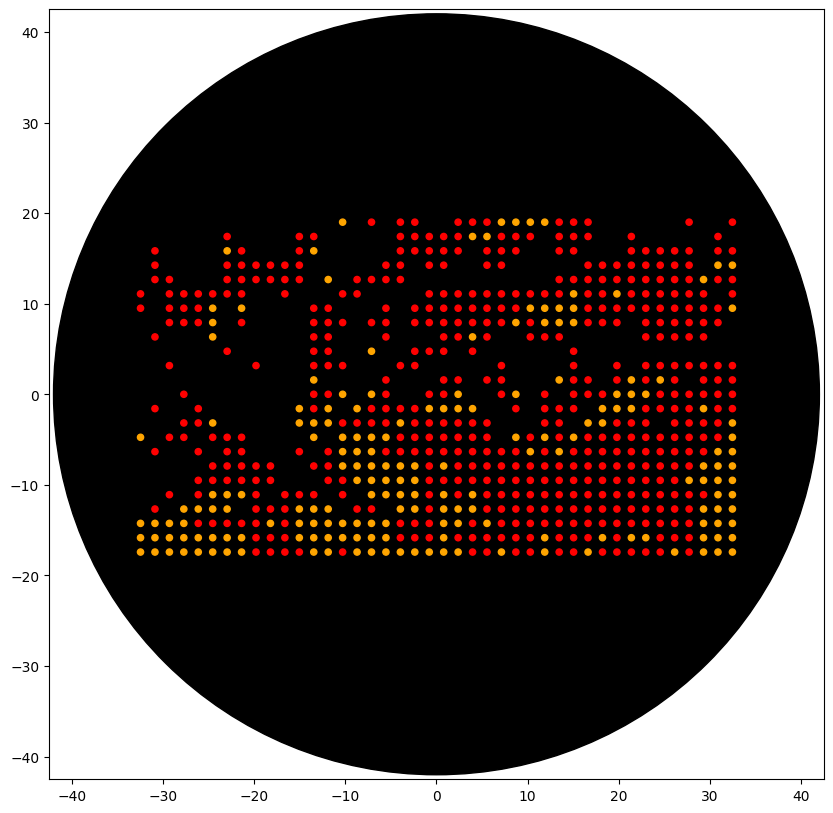
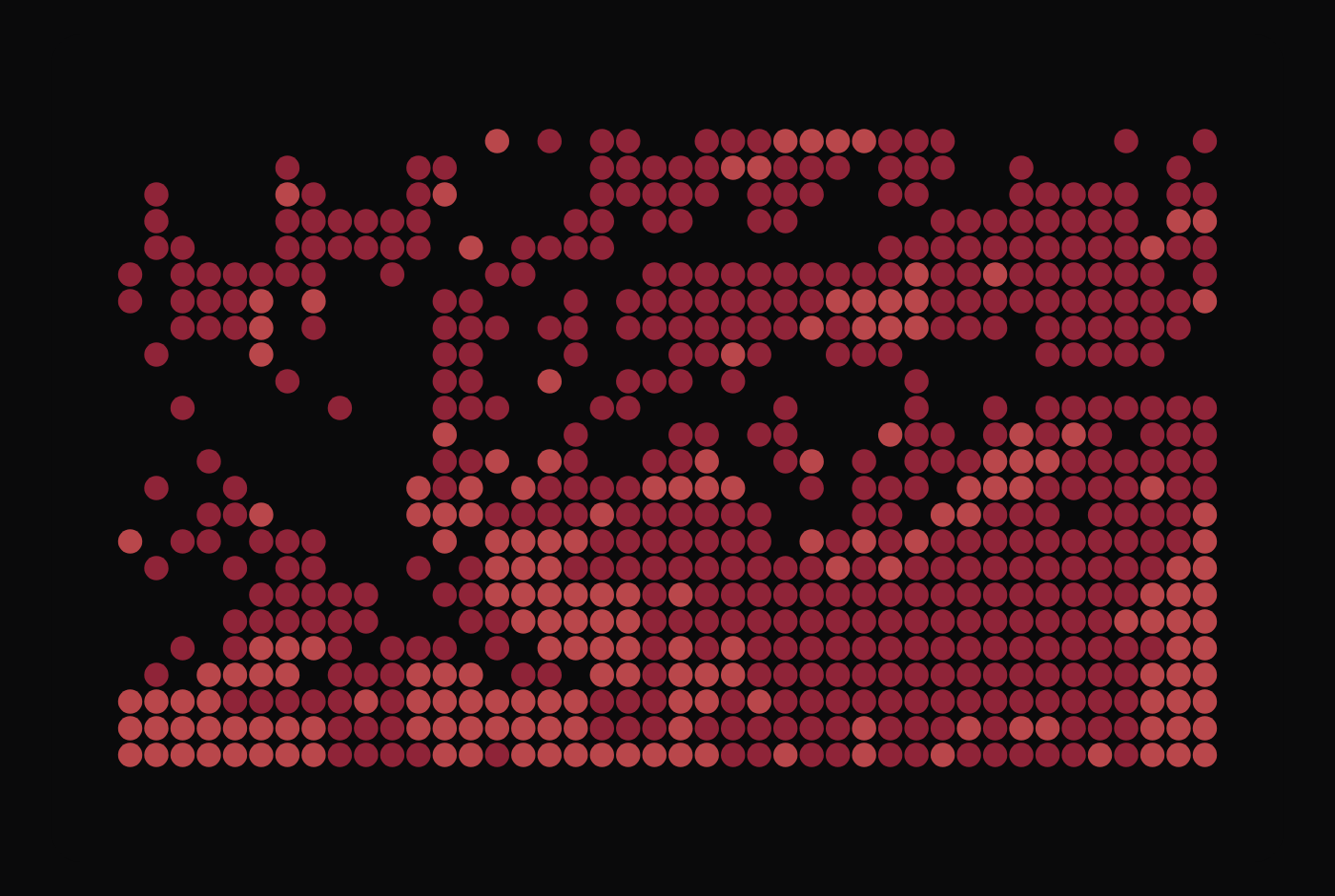 Here is the python output from googlecolab:
Part 02: 1: Find and describe a published paper that utilizes the Opentrons or an automation tool to achieve novel biological applications. Bryant et al. (2023). AssemblyTron: Flexible Automation of DNA Assembly with Opentrons OT-2 Lab Robots. Synthetic Biology, Volume 8, Issue 1. DOI: 10.1093/synbio/ysac032 While many tools exist to automate the Design, Test, and Learn steps of the Design-Build-Test-Learn (DBTL) cycle, the Build step (which involves physically assembling DNA) remains largely manual, low throughput and error-prone. AssemblyTron is an open-source Python software package that integrates DNA assembly design software outputs with the Opentrons OT-2 liquid handling robot, enabling automated execution of DNA assembly protocols with minimal human intervention.
2: Write a description about what you intend to do with automation tools for your final project. You may include example pseudocode, Python scripts, 3D printed holders, a plan for how to use Ginkgo Nebula, and more. You may reference this week’s recitation slide deck for lab automation details. I will create an assay to run on nebula to verify if the synthesised nanobody is folding properly & GFP is quantified.