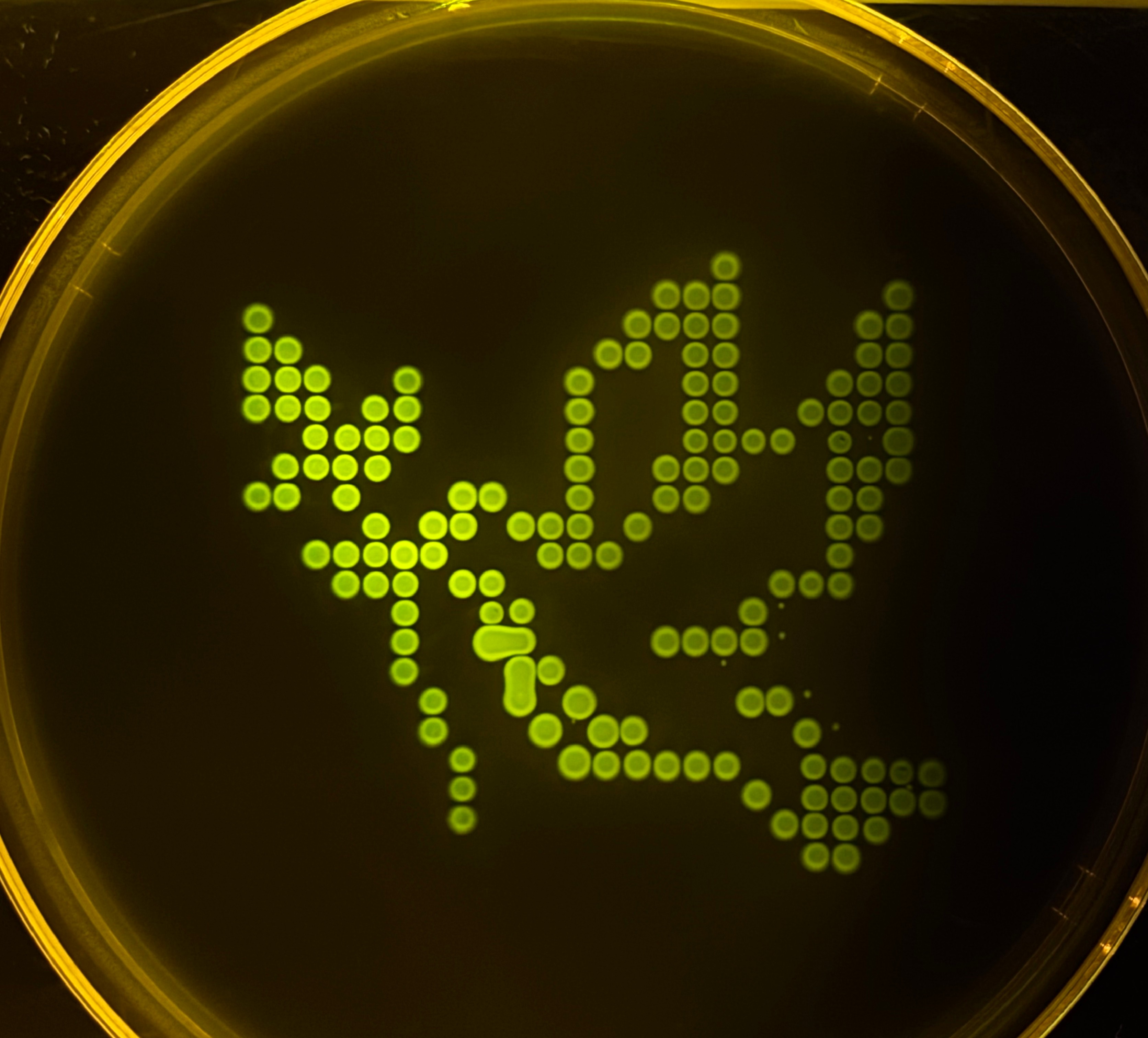
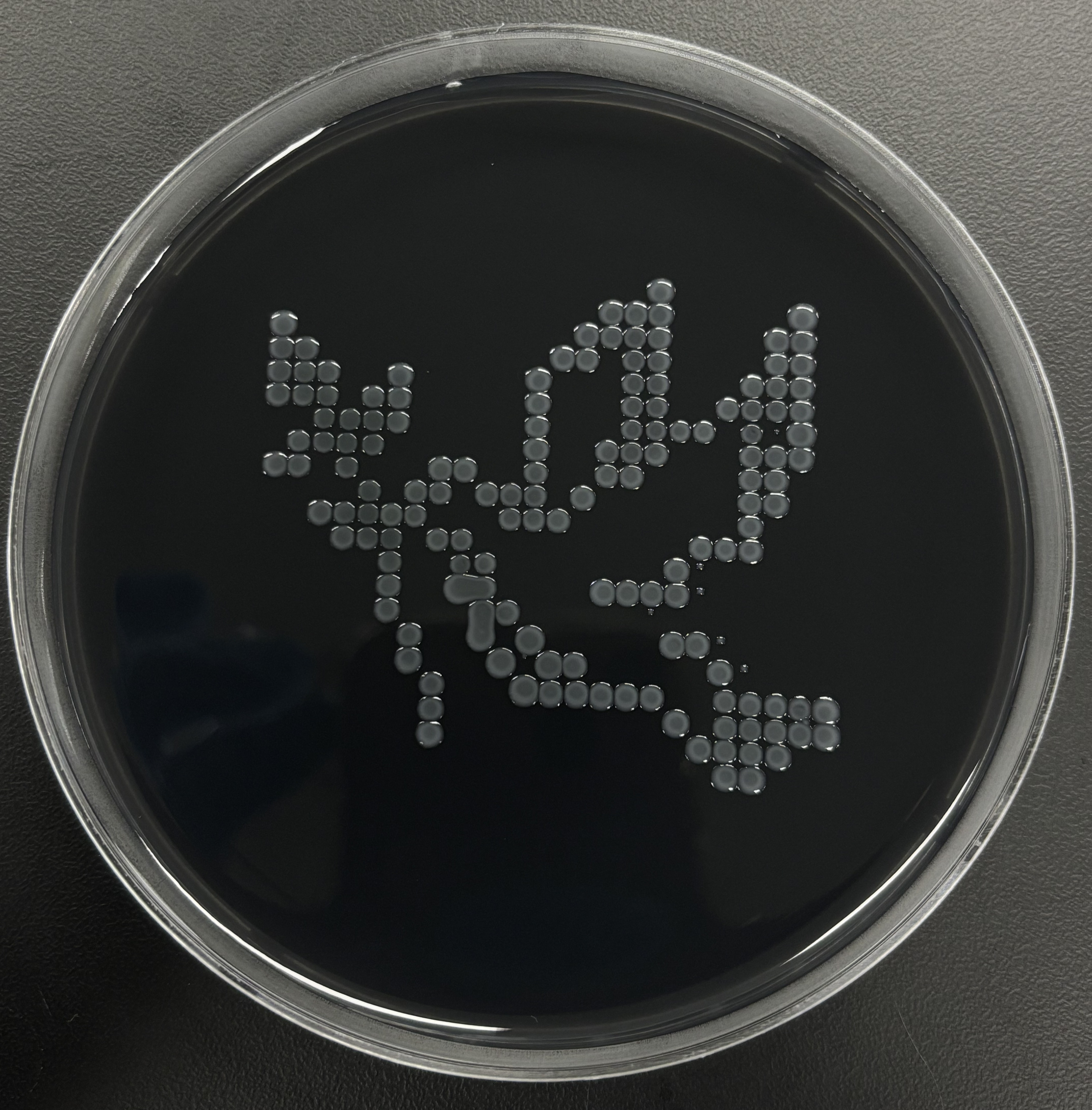
This week involved the plating and growth of a design created via the controlled aspiration of fluorescent Escherichia Coli (E. coli) through the OT-2 virtual platform.
After some brief iteration, I settled on an 8-bit interpretation of the classic ‘dove with olive branch’, a relatively universal symbol of peace. As DesignerCells only has access to sfGFP and mRFP1 fluorescent recombinants, this design provided a suitable compromise to the design limitations. I will include the final outcome pending the lab is successful (fingers crossed!).
ChatGPT was used in conjunction with the CoLabs reference code to create the final script for the OT-2 liquid handling platform:
from opentrons import types

metadata = {    # see https://docs.opentrons.com/v2/tutorial.html#tutorial-metadata
    'author': 'Zander Morris',
    'protocolName': 'P(eace)CR',
    'description': 'Prints the P(eace)CR graphic via the set of data points.',
    'source': 'HTGAA 2026 Opentrons Lab',
    'apiLevel': '2.20'
}

##############################################################################
###   Robot deck setup constants - don't change these
##############################################################################

TIP_RACK_DECK_SLOT = 9
COLORS_DECK_SLOT = 6
AGAR_DECK_SLOT = 5
PIPETTE_STARTING_TIP_WELL = 'A1'

well_colors = {
    'A1' : 'Red',
    'B1' : 'Green',
    'C1' : 'Orange'
}

sfgfp_points = [(-26.4, 21.6),(-26.4, 19.2),(-24, 19.2),(-26.4, 16.8),(-24, 16.8),(-21.6, 16.8),(-14.4, 16.8),(-26.4, 14.4),(-24, 14.4),(-21.6, 14.4),(-16.8, 14.4),(-14.4, 14.4),(-21.6, 12),(-19.2, 12),(-16.8, 12),(-14.4, 12),(-24, 9.6),(-21.6, 9.6),(-19.2, 9.6),(-16.8, 9.6),(-26.4, 7.2),(-24, 7.2),(-19.2, 7.2),(-16.8, 4.8),(-21.6, 2.4),(-19.2, 2.4),(-16.8, 2.4),(-19.2, 0),(-16.8, 0),(-14.4, 0),(-14.4, -2.4),(-14.4, -4.8),(-14.4, -7.2),(-12, -9.6),(-12, -12),(-9.6, -14.4),(-9.6, -16.8),(-9.6, -19.2)]
mrfp1_points = [(12, 26.4),(7.2, 24),(9.6, 24),(12, 24),(26.4, 24),(4.8, 21.6),(7.2, 21.6),(9.6, 21.6),(12, 21.6),(24, 21.6),(26.4, 21.6),(2.4, 19.2),(4.8, 19.2),(9.6, 19.2),(12, 19.2),(24, 19.2),(26.4, 19.2),(0, 16.8),(9.6, 16.8),(12, 16.8),(21.6, 16.8),(24, 16.8),(26.4, 16.8),(0, 14.4),(9.6, 14.4),(12, 14.4),(19.2, 14.4),(21.6, 14.4),(24, 14.4),(26.4, 14.4),(0, 12),(9.6, 12),(12, 12),(14.4, 12),(16.8, 12),(21.6, 12),(24, 12),(26.4, 12),(0, 9.6),(7.2, 9.6),(9.6, 9.6),(12, 9.6),(21.6, 9.6),(24, 9.6),(26.4, 9.6),(-9.6, 7.2),(-7.2, 7.2),(0, 7.2),(7.2, 7.2),(9.6, 7.2),(21.6, 7.2),(24, 7.2),(-12, 4.8),(-9.6, 4.8),(-4.8, 4.8),(-2.4, 4.8),(0, 4.8),(4.8, 4.8),(21.6, 4.8),(24, 4.8),(-14.4, 2.4),(-12, 2.4),(-2.4, 2.4),(0, 2.4),(2.4, 2.4),(21.6, 2.4),(-9.6, 0),(-7.2, 0),(16.8, 0),(19.2, 0),(21.6, 0),(-7.2, -2.4),(-4.8, -2.4),(14.4, -2.4),(16.8, -2.4),(19.2, -2.4),(-7.2, -4.8),(-4.8, -4.8),(7.2, -4.8),(9.6, -4.8),(12, -4.8),(14.4, -4.8),(16.8, -4.8),(-4.8, -7.2),(-2.4, -7.2),(12, -7.2),(-4.8, -9.6),(-2.4, -9.6),(0, -9.6),(14.4, -9.6),(16.8, -9.6),(19.2, -9.6),(-2.4, -12),(0, -12),(2.4, -12),(4.8, -12),(19.2, -12),(21.6, -12),(0, -14.4),(2.4, -14.4),(4.8, -14.4),(7.2, -14.4),(9.6, -14.4),(12, -14.4),(19.2, -14.4),(21.6, -14.4),(24, -14.4),(26.4, -14.4),(28.8, -14.4),(14.4, -16.8),(19.2, -16.8),(21.6, -16.8),(24, -16.8),(26.4, -16.8),(28.8, -16.8),(16.8, -19.2),(19.2, -19.2),(21.6, -19.2),(24, -19.2),(19.2, -21.6),(21.6, -21.6),(19.2, -24)]

def run(protocol):
  ##############################################################################
  ###   Load labware, modules and pipettes
  ##############################################################################

  # Tips
  tips_20ul = protocol.load_labware('opentrons_96_tiprack_20ul', TIP_RACK_DECK_SLOT, 'Opentrons 20uL Tips')

  # Pipettes
  pipette_20ul = protocol.load_instrument("p20_single_gen2", "right", [tips_20ul])

  # Modules
  temperature_module = protocol.load_module('temperature module gen2', COLORS_DECK_SLOT)

  # Temperature Module Plate
  temperature_plate = temperature_module.load_labware('opentrons_96_aluminumblock_generic_pcr_strip_200ul',
                                                      'Cold Plate')
  # Choose where to take the colors from
  color_plate = temperature_plate

  # Agar Plate
  agar_plate = protocol.load_labware('htgaa_agar_plate', AGAR_DECK_SLOT, 'Agar Plate')  ## TA MUST CALIBRATE EACH PLATE!
  # Get the top-center of the plate, make sure the plate was calibrated before running this
  center_location = agar_plate['A1'].top()

  pipette_20ul.starting_tip = tips_20ul.well(PIPETTE_STARTING_TIP_WELL)

  ##############################################################################
  ###   Patterning
  ##############################################################################

  ###
  ### Helper functions for this lab
  ###

  # pass this e.g. 'Red' and get back a Location which can be passed to aspirate()
  def location_of_color(color_string):
    for well,color in well_colors.items():
      if color.lower() == color_string.lower():
        return color_plate[well]
    raise ValueError(f"No well found with color {color_string}")

  # For this lab, instead of calling pipette.dispense(1, loc) use this: dispense_and_detach(pipette, 1, loc)
  def dispense_and_detach(pipette, volume, location):
      """
      Move laterally 5mm above the plate (to avoid smearing a drop); then drop down to the plate,
      dispense, move back up 5mm to detach drop, and stay high to be ready for next lateral move.
      5mm because a 4uL drop is 2mm diameter; and a 2deg tilt in the agar pour is >3mm difference across a plate.
      """
      assert(isinstance(volume, (int, float)))
      above_location = location.move(types.Point(z=location.point.z + 5))  # 5mm above
      pipette.move_to(above_location)       # Go to 5mm above the dispensing location
      pipette.dispense(volume, location)    # Go straight downwards and dispense
      pipette.move_to(above_location)       # Go straight up to detach drop and stay high

  ###
  ### YOUR CODE HERE to create your design
  ###

  # -----------------------------
  # Printing parameters
  # -----------------------------
  VOL_PER_DOT = 0.75

  # Keep aspirates comfortably below 20uL for accuracy/safety
  MAX_ASPIRATE_UL = 18.0
  MAX_BATCH_DOTS = int(MAX_ASPIRATE_UL // VOL_PER_DOT)  # 18.0 // 0.75 = 24

  # Choose where on Z you actually want to dispense.
  # Start conservative: 0 means "at agar_plate['A1'].top() plane".
  # If your drops need to touch the agar more, try -0.5 or -1.0 after testing.
  DISPENSE_DZ = 2

  def point_location_from_center(dx, dy, dz=DISPENSE_DZ):
      # Offsets are in mm
      return center_location.move(types.Point(x=dx, y=dy, z=dz))

  def print_points(points, color_name):
      pipette_20ul.pick_up_tip()

      i = 0
      while i < len(points):
          batch = points[i:i + MAX_BATCH_DOTS]
          batch_volume = len(batch) * VOL_PER_DOT

          # Pull enough dye for this batch
          pipette_20ul.aspirate(batch_volume, location_of_color(color_name))

          # Dispense each dot
          for (dx, dy) in batch:
              loc = point_location_from_center(dx, dy)
              dispense_and_detach(pipette_20ul, VOL_PER_DOT, loc)

          i += MAX_BATCH_DOTS

      pipette_20ul.drop_tip()

  # -----------------------------
  # Print your two datasets
  # -----------------------------
  print_points(sfgfp_points, "Green")
  print_points(mrfp1_points, "Red")
Prompts were primarily as follows. Small corrections and confirmations were omitted for clarity:
Thank you TA’s for carrying out the labwork and sharing the magnificent photos! Very pleased with the result.
This paper details the use of the OT-2 as a means to automate various processes and assays associated with the culture of patient-derived organoids. Conventionally a process performed manually, the scaffold-supported platform for orgonoid-based tissue (SPOT) method is automated as a possible solution to improve throughput and scalability. This approach provides a possible solution to the limited conventional scalability of SPOT. As SPOT is a method of drug discovery, specifically in the development of therapeutics personalized to the specific tissue of a patient’s tumour, increasing the speed and volume at which this process may be performed via OT-2 lab automation is a highly promising application of lab-automation technology.
I want to investigate the process of controlling the spatial formation of a biofilm (or the biomineralisation process) across the surface of a morphable 3D artifact (scaffold).
Although I am still unsure of the precise outcome, I would like to explore the possibility of integrating automation at two points:
I will work to crystalise the precise integration of automation methods in the coming weeks.
Cao, R., Li, N.T., Latour, S., Cadavid, J.L., Tan, C.M., Forman, A., Jackson, H.W. and McGuigan, A.P. (2023). An Automation Workflow for High‐Throughput Manufacturing and Analysis of Scaffold‐Supported 3D Tissue Arrays. Advanced Healthcare Materials, [online] 12(19). doi:https://doi.org/10.1002/adhm.202202422.
CR.png)